
How to Scale PPC Without Burning Money: A Smart Manager’s Guide

Did you know that scale PPC without burning can raise your CPA by 25-50%? I’ve seen it happen countless times, eager marketers pump up their ad spend, only to watch their ROI crash and burn for weeks afterwards
I get it. You want bigger results faster. But scaling PPC without setting your money on fire isn’t about dumping more cash into your campaigns.
Here’s what most people miss: when you make those drastic budget changes, you’re basically forcing the system to start from scratch, relearning where and how to spend your advertising dollars efficiently. This happens whether you’re scaling display ads or carefully expanding Performance Max campaigns.
The golden rule I’ve discovered through years of managing campaigns? Keep your budget increases within 10-20% per adjustment. This measured approach prevents you from resetting that dreaded learning phase and keeps your performance stable.
Before you even think about increasing your budget, you need to understand exactly where your advertising dollars are working hardest. Making your marketing budget more efficient starts with identifying your rock star campaigns and spotting those money-draining underperformers. For example, on Amazon, you can get up to 10% back on sales from external traffic – that’s an easy way to drive more sales without spending an extra penny.
Throughout this guide, I’ll walk you through exactly how to scale your PPC campaigns strategically, maintain performance during growth periods, and ultimately expand your reach without watching your marketing budget go up in flames. Let’s get started with the smart way to scale your digital advertising.
Scale PPC Without Burning Money
Image Source: Vital Design
Building a sturdy foundation comes first in any scaling effort. Many business owners mistakenly believe launching PPC campaigns will instantly boost their business. Newsflash – throwing money at poorly structured campaigns only amplifies existing problems.
Define your PPC goals clearly
What are you actually trying to achieve with your PPC campaigns? Setting specific objectives creates the backbone of successful advertising. Rather than vaguely aiming to “increase traffic,” identify exactly what you need.
I always start by aligning PPC goals with broader business objectives, whether that’s boosting brand awareness, generating leads, or driving sales. This isn’t just nice-to-have, it’s essential.
Make your goals SMART and results-oriented. “Generate 1,000 leads” doesn’t cut it. A better approach: “By December 2022, increase sales month-over-month by 5% while decreasing cost per lead by 2%“. See the difference? This clarity gives you tangible metrics to evaluate success as you scale.
Don’t forget to separate your short-term and long-term objectives. Your weekly or monthly targets are great benchmarks, but your quarterly or annual goals provide the strategic direction you need for sustainable scaling.
Audit current campaign performance
Before pumping more money into your campaigns, take a good hard look at what’s already working. Regular PPC audits reveal specific areas needing improvement and help prevent wasted spend. Trust me on this one.
Start by analyzing your core KPIs:
- Click-through rates
- Conversion rates
- Quality Scores
- Impressions
Google ranks your ad quality from 1-10 based on expected CTR, ad relevance, and landing page experience. A higher Quality Score typically means lower costs per click, making optimisation before scaling even more critical.
Site performance matters too. Even with a six-figure monthly ad spend, a 3+ second load time can drastically reduce conversion rates. As one expert puts it, “You can have the biggest PPC budget on the planet, but if your site loads like it’s stuck in 2004, you’re setting fire to your own strategy”.
Understand your ROAS and CPA baselines
Two fundamental metrics provide your scaling compass: Return on Ad Spend (ROAS) and Cost Per Acquisition (CPA).
ROAS measures revenue generated for every dollar spent on advertising. To calculate it, just divide ad revenue by ad spend. For example, spending $100,000 to earn $400,000 in revenue gives you a 4:1 ROAS. Generally, you want to aim for at least 2.87:1 ROAS.
CPA, on the other hand, measures how much you pay to acquire a single customer or conversion. This metric is gold for lead generation campaigns.
How do you determine your maximum allowable CPA? Consider your sales closing rate and potential deal value. If each lead has a potential $5,000 value with a 2% closing rate, your break-even cost per lead would be $100. Simple math, big impact.
You’ll need to understand which metric suits your business model best:
- For fixed cost/payout models, CPA works best, making it ideal for lead generation
- For variable purchase values, focus on ROAS, perfect for e-commerce
By establishing these baselines before scaling, you create clear benchmarks to maintain as you grow your campaigns. Without them, you’re basically flying blind and risking your budget on inefficient advertising that looks successful but fails to deliver meaningful business results.
Scale Gradually to Avoid Performance Drops
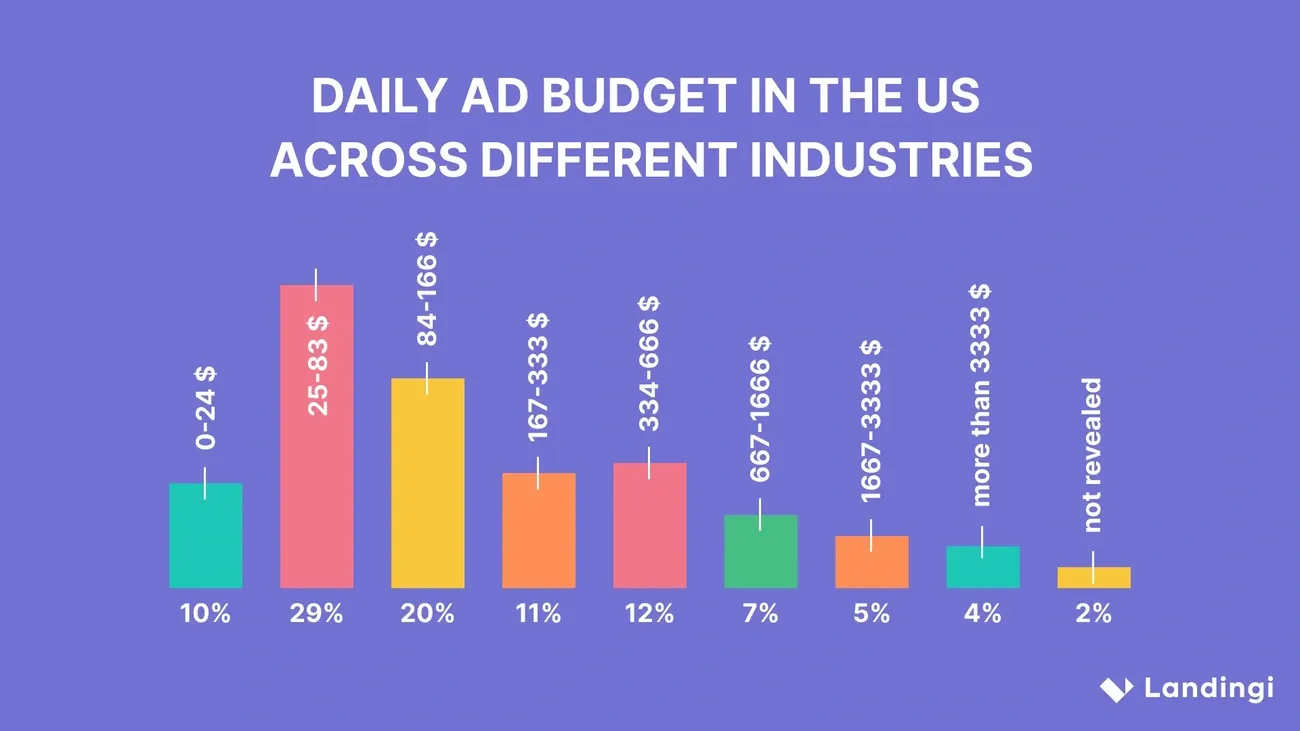
Image Source: Landingi
Want to grow your results fast? I know that feeling. The urge to dramatically boost your PPC budget is hard to resist, but those sudden jumps often crash your performance. I’ve watched countless campaigns nosedive after budgets doubled overnight. Trust me, the smarter play is incremental growth, methodically expanding your reach without tanking your efficiency.
Why 10-20% budget increases work best
When you increase budgets by 10-20% at a time, you’re giving those ad platform algorithms room to breathe. They can adapt without those wild performance swings. Small adjustments let algorithms optimize delivery without going haywire, keeping your conversion metrics stable while growing your reach.
Let’s make this real. Say your campaign is crushing it with a $1,000 monthly budget. Don’t jump straight to $3,000, that’s asking for trouble. Instead, bump it up to $1,200 (that’s 20%), then watch performance for 1-2 weeks. If everything stays solid, adjust again. This step-by-step approach means you’ll spot any negative trends right away and can fix them before they burn through your budget.
Those massive budget increases? They typically cause higher CPCs and tons of wasted spend. Without doing proper homework, sudden budget jumps can drive down ROAS by 15% or more while bringing in less qualified traffic. One expert I spoke with put it perfectly: “We’ve seen clients pump infinite money into their PPC campaigns with hopes of scaling, only to encounter a crash-landing”.
How to avoid resetting the learning phase
The learning phase is when platforms gather all that juicy performance data to optimize your campaigns. Big changes reset this whole process, causing those frustrating performance roller coasters. To keep things steady, steer clear of these learning-phase triggers:
- Budget changes exceeding 20% of current spend
- Switching bid strategies
- Changing the conversion tracking setup
- Making significant structural changes to campaigns
When you dramatically alter your budget, you force algorithms to completely reconsider who should see your ads. Each time you reset learning, you’re basically starting from scratch, dragging out that painful period of performance wobbles. For the best results, space your budget increases at least 5-7 days apart, since learning typically takes five days to stabilize.
Is your campaign consistently hitting conversion goals? Then set up a structured scaling plan with roughly 15% weekly increases. This disciplined approach saves you from those chaotic performance swings that come with aggressive budget shifts.
When to use stacked scaling for faster growth
Sometimes your business goals just can’t wait. In these cases, try stacked scaling, it’s a nifty technique that keeps platform learning intact while speeding up your growth.
Stacked scaling works best when your campaigns show “limited by budget” status but still maintain stable CPA metrics. Instead of making drastic changes to existing campaigns, create duplicate campaigns with slight variations. This preserves all that valuable learning in your original campaign while testing expanded parameters.
Look at what Adriaan Dekker did, he boosted a client’s Google Ads spend by 22% while simultaneously improving ROAS by 15% through smart campaign segmentation. His approach was brilliant:
- Found the top-performing products in the existing campaign
- Created a separate campaign just for these best-sellers
- Increased budget specifically for these tested winners
- Kept original budget levels for everything else
This segmentation strategy lets you focus budget increases on verified winners without disrupting all that precious algorithm learning or diluting your overall performance.
Keep an eye on impression share metrics, they’re gold for spotting scaling opportunities. When your campaigns show substantial “impression share lost due to budget” (at least 15%), implement those 5-10% budget increases every other week until that metric drops below 5%.
Optimize Budget Allocation for Efficiency
Smart budget allocation is the backbone of efficient PPC scaling. Once you’ve got your foundation set and you’re implementing those gradual increases, your next step is making sure every dollar works as hard as possible, getting maximum return without wasteful spending.
Shift spend to high-performing campaigns
I’ve found that successful PPC management needs dynamic budget allocation rather than rigid monthly distributions. My approach? Move money from campaigns that aren’t delivering to the ones crushing their goals. This simple shift can dramatically boost your ROI while adapting to market changes.
As Mark Irvine puts it, “A comical number of problems in PPC are solved with basic math and simple budget management… ‘just move money around’ is a 10-minute solution that can fix accounts of any size”.
Don’t get stuck with those rigid monthly budgets. Instead, analyse performance regularly and be ready to shift. For example, if your plumbing campaign is beating CPA targets while electrical services are struggling, move some money to plumbing until you fix what’s wrong with electrical. And if Facebook ads are outperforming LinkedIn or Google this month? You guessed it, increase Facebook spend accordingly.
This flexibility should extend across platforms, too. Keep a close eye on which platforms are actually meeting your goals and providing the best ROI. Be ready to shift funds away from underperforming platforms to the ones delivering real value.
Use budget simulators and forecasting tools
Ever wonder what would happen if you increased your budget by a specific amount? That’s exactly what budget simulators help you figure out. Google Ads offers several simulators that show you how different bid changes might affect your weekly results:
- Bid Simulators reveal how max CPC changes affect clicks, conversions, and costs
- Campaign Bid Simulators give you campaign-wide estimates
- Shopping Campaigns Bid Simulators predict how product group performance might change
These tools aren’t just guessing, they collect and analyze data from actual ad auctions while factoring in things like your Quality Score, keyword traffic, and competition. Let’s say you have a max CPC bid of $1.00 but you’re curious about what might happen at $1.50. The simulators will show you estimated clicks, cost, impressions, and conversions you would likely have seen.
Google isn’t the only game in town, either. Platforms like Optmyzr and Adalysis can spotlight campaigns with excess budget or ones losing impression share because they’re limited by budget. These insights help you move money to your winners while avoiding throwing good money after bad.
Avoid overfunding underperforming ad sets
Pouring more money into campaigns that aren’t performing well? That’s like watering dead plants, it just wastes resources. Meta’s Advantage Campaign Budget (formerly Campaign Budget Optimization) automatically distributes your campaign budget to the best-performing ad sets. If Ad Set 1 is crushing it while others lag behind, more budget automatically flows to the winner.
Here’s something interesting, Meta actually recommends not pausing underperforming ad sets when using this feature. Since the algorithm is constantly adjusting spending, it naturally allocates less to poor performers. Pausing them actually disrupts this optimization process.
Another approach I like is creating custom automated rules to manage underperformers. For example, you can set rules to automatically turn off ad sets that have spent more than 2.5 times your target CPL without generating a single lead. This precision ensures your budget flows to what’s actually working, maximizing the impact of every dollar spent.
Use Smart Bidding and Automation Wisely
Smart bidding strategies can seriously supercharge your scaling efforts, but picking the right approach makes all the difference between burning money and maximizing returns. I love how machine learning now handles what used to require constant manual tweaking, automatically setting bids based on all kinds of auction-time signals.
When to use target ROAS vs. target CPA
I get this question all the time. Let me break it down simply:
Target CPA works best when:
- You’re mainly focused on generating leads
- Each conversion has roughly the same value
- Your business model has fixed cost structures
Target ROAS shines when:
- You’re selling products with different price points
- Revenue matters more to you than just conversion numbers
- You’re running an e-commerce business
I personally prefer Target ROAS with my e-commerce clients, but I’ve found Target CPA absolutely invaluable for service businesses with consistent lead values. At the end of the day, your campaign objective should determine which strategy fits best, not just personal preference.
One thing to remember: these strategies need historical data to work their magic. For Target CPA, you’ll want at least 30 conversions in your account before implementation. Target ROAS is even more data-hungry, typically needing 50+ conversions within the last month.
How to monitor automated bidding behavior
Just because it’s automated doesn’t mean you can set it and forget it. I check my client accounts daily after implementing smart bidding, watching for:
- Performance wobbles during the learning phase (usually takes 5-7 days)
- Whether actual CPA/ROAS matches what we’re targeting
- Any shifts in impression share and auction insights
Beyond just eyeballing metrics, I set up custom performance monitors in tools like Adalysis, which runs over 100 automated checks daily. These alerts immediately flag sudden changes in important metrics like impression share, costs, or conversions.
Avoid making multiple changes at once
Nothing messes up automated bidding quite like constant tinkering. Sure, adjusting targets seems harmless, but each significant change resets that pesky learning phase. Here’s what I tell my clients:
- Make tiny incremental adjustments (5-10% at most)
- Wait at least 14 days between major changes
- Don’t make multiple changes at the same time
Small tweaks to tROAS/tCPA targets send signals to Google’s algorithms without completely resetting learning. Lowering Target ROAS or raising Target CPA pushes your bids up, while raising Target ROAS or lowering Target CPA brings bids down.
Track, Test, and Tweak for Long-Term Profitability
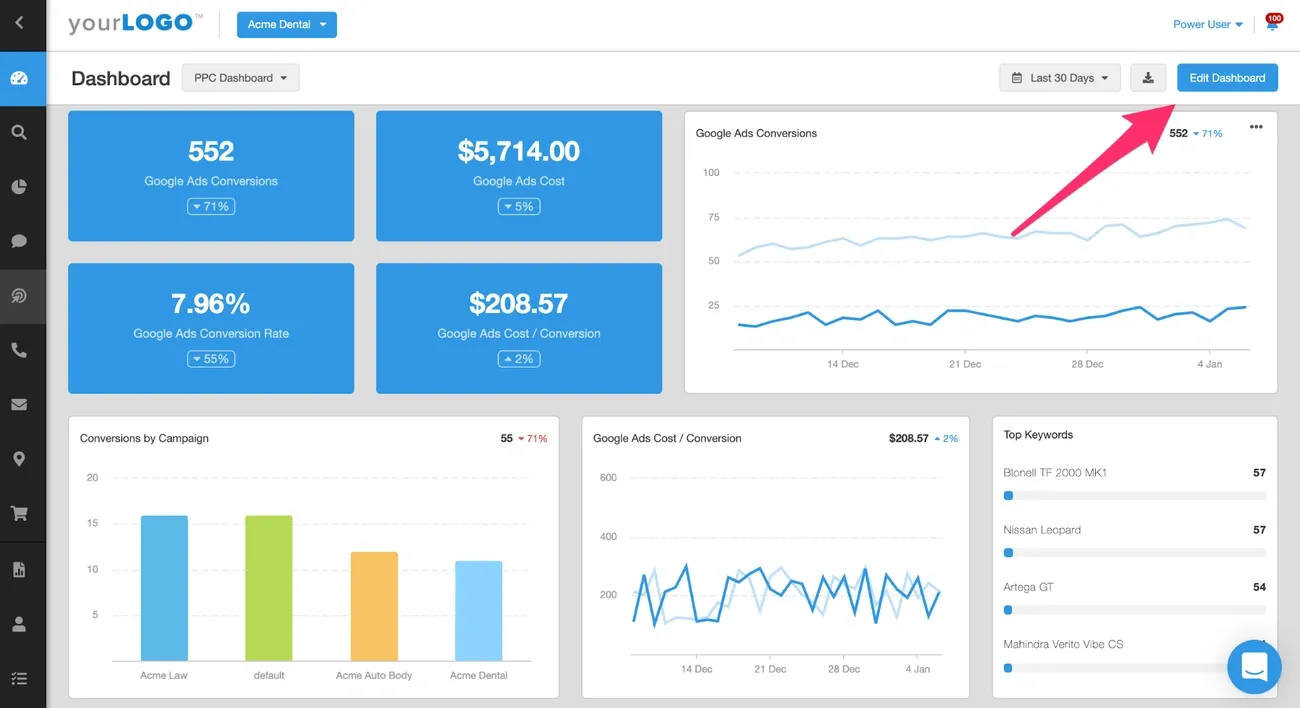
Image Source: AgencyAnalytics
Want to know what separates PPC winners from budget-wasters? It’s not fancy strategies or massive budgets, it’s good old-fashioned vigilance.
I’ve managed countless campaigns, and here’s the truth: profitable PPC isn’t a set-and-forget affair. It requires constant optimization based on what your data tells you. The real approach to long-term success? Building monitoring systems that catch issues before they drain your wallet dry.
Monitor key metrics after each budget change
You can’t improve what you don’t measure. When I scale campaigns, I zero in on these critical metrics after every budget adjustment:
- Conversion rate shifts (these should stay pretty stable during proper scaling)
- ROAS fluctuations (watch out for those sudden drops after you increase budget)
- Segmented performance by campaign (Google Ads’ segmentation view is perfect for this)
- CPC changes (rising costs usually mean you’ve got increasing auction pressure)
Here’s a trick I love: set up a Budget Utilization Ratio (BUR) custom column using this formula: Cost:last 30 days / 30 / daily budget. This quickly shows you which campaigns have room to grow and where you can safely shift budget to your star performers.
Test new keywords and ad groups carefully
Rushing tests is like gambling with your ad budget. I’ve seen so many marketers make changes based on hunches rather than statistical significance.
When testing, patience pays off. I always recommend conducting tests on large samples to truly determine what works. For example, with Responsive Search Ads, pinning assets creates fewer ad combinations, which actually helps the machine learning understand which combinations perform best.
Here’s something most people miss: pick your testing metrics before you start. While CTR helps boost your Quality Score, conversion per impression (CPI) is far more valuable for actual business outcomes. And if you’re in ecommerce? Focus on revenue per impression to squeeze maximum money from each ad view.
Use alerts and dashboards to catch issues early
In high-spend accounts, things can go south in hours, not days. A sudden CPC spike or conversion drop can burn through your budget before your morning coffee. That’s why I’ve set up automated performance monitors that run over 100 checks daily to flag concerning trends immediately.
At minimum, set up custom alerts for:
- Sudden increases in spend
- Significant drops in conversions
- Unexpected declines in search clicks
- Budget pacing deviations
Get these notifications via email or Slack so you can jump on problems right away. Daily reviews should focus on catching weird anomalies and checking pacing across your heavy-hitter campaigns, while weekly audits give you space to investigate patterns and make thoughtful optimizations.
Remember, surface-level PPC analysis just doesn’t cut it. Break down performance by device type, match type, time of day, all that good stuff. This deeper segmentation reveals exactly where your budget is crushing it and where it’s falling flat, so you can make targeted adjustments instead of broad, hope-based changes.
Time to Scale Like a Pro (Without Setting Your Money on Fire)
Scaling PPC campaigns isn’t about throwing more cash at your ads and hoping for the best. It’s about being smart, methodical, and patient. Throughout this guide, I’ve shared the strategies I’ve personally seen work time and again with my clients. The bottom line? Successful scaling starts with that solid foundation, clearly defined goals, regular performance checks, and established ROAS or CPA baselines that act as guardrails for your campaigns.
Remember when I mentioned those 10-20% gradual budget increases? I can’t stress this enough. While doubling your budget overnight might seem tempting, those small, measured adjustments are what maintain algorithmic stability and prevent those painful learning phase resets. Your platforms need time to optimize without going haywire.
And let’s talk about where your money actually goes. Smart budget allocation makes every dollar work harder. Moving spend toward your high-performing campaigns while using those budget simulators ensures you’re not pouring money into underperforming ad sets. It’s basically putting your best players on the field.
But here’s what separates the pros from the amateurs: constant vigilance. After each budget change, you need to track those key metrics carefully, test new keywords strategically, and set up alerts that catch issues before they drain your wallet. This isn’t a set-it-and-forget-it game, it’s an ongoing process that requires attention.
Ready to scale your PPC without the waste? Visit GrowLeads.io now! My team has implemented these exact strategies across numerous accounts, consistently driving growth without tanking performance. The difference between profitable scaling and burning money often comes down to patience, analytics, and strategic adjustments, not the most exciting approach, but one that delivers real returns.
Look, scaling PPC might seem overwhelming at first, but breaking it down into these manageable steps makes significant growth totally achievable without those dreaded performance drops. You can absolutely maintain your performance metrics while expanding your reach, creating campaigns that actually contribute to your business growth rather than just eating up your marketing budget.
What are you waiting for? Start applying these strategies today and watch your campaigns grow the smart way.
FAQs
Q1. How can I scale my PPC campaigns without overspending?
To scale PPC campaigns effectively, increase budgets gradually by 10-20% at a time, monitor performance closely, and optimize budget allocation to high-performing campaigns. Use smart bidding strategies wisely and continuously test and refine your approach.
Q2. What’s the best way to allocate my PPC budget when scaling?
Shift spend to high-performing campaigns, use budget simulators and forecasting tools to predict outcomes, and avoid overfunding underperforming ad sets. Regularly analyze performance data to make informed decisions about budget distribution across campaigns and platforms.
Q3. How do I maintain ROAS while increasing PPC spend?
As you scale, some decrease in ROAS is normal. Focus on overall profit rather than just ROAS. Optimize your website, especially for mobile users, improve your product feed, and refine ad creative. Consider using target ROAS bidding to balance spend and efficiency.
Q4. What metrics should I monitor when scaling PPC campaigns?
Keep a close eye on conversion rates, ROAS fluctuations, segmented performance by campaign, CPC changes, and budget utilization ratio. Set up custom alerts for sudden increases in spend, significant drops in conversions, or unexpected declines in search clicks.
Q5. How often should I make changes when scaling PPC campaigns?
Avoid making multiple changes simultaneously. After increasing budgets, wait at least 5-7 days before making another adjustment to allow for the learning phase. For major changes, it’s best to wait 14 days between adjustments. Continuously monitor performance but resist the urge to tinker too frequently.

Runs paid acquisition across Google, LinkedIn, and Meta for B2B pipeline.