
Daily vs Monthly PPC Budget: Which Actually Gets Better ROI?

Struggling with your PPC campaigns? I get you.
The choice between daily vs monthly PPC budget approaches might seem like a small detail, but I’ve watched it completely make or break campaign performance for my clients. Here’s something that catches most advertisers off guard – Google’s daily budgets aren’t actually strict daily caps. They can spend up to twice your set amount on days with high traffic. Sounds flexible, right? It is – until you check your account and discover unexpected overspending.
Many businesses work with fixed monthly or quarterly media budgets, but how you structure that PPC budget makes a huge difference in your results. I’ve seen this firsthand. In one case, a strategic budget adjustment saved saving $1,000 in spend while delivering 99 more conversions and dropping the CPA by $0.74. That’s money straight to the bottom line. But be careful – with average cost per click hitting $2-4 across most industries, poor budgeting decisions quickly turn into either wasted dollars or missed opportunities.
I couldn’t count how many PPC campaigns I’ve managed over the years, but I’ve learned one thing for sure: effective budget management is a serious balancing act. If you’re just starting out, you’re probably looking at $15,000-20,000 monthly for an effective campaign. Whether you’re launching new or optimizing existing accounts, your choice between daily and monthly approaches affects everything from how your conversions pace throughout the month to whether your ads even show up at critical times. Let’s dive into which budgeting style will actually deliver better ROI for your specific situation.
Daily vs Monthly PPC Budget: Core Differences
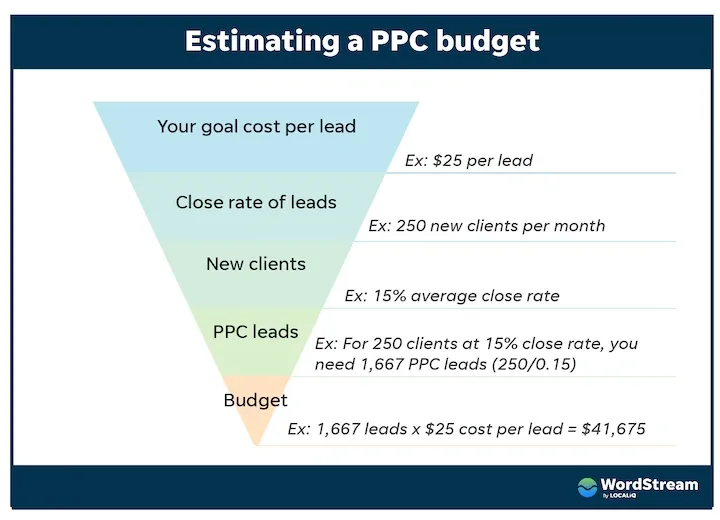
Image Source: WordStream
When it comes to PPC budgets, understanding the differences between daily and monthly approaches isn’t just technical nitpicking – it actually affects your bottom line. I’ve seen these differences impact everything from campaign performance to how quickly you can respond when market opportunities pop up.
How daily budgets work in Google Ads
Here’s something that surprises a lot of my clients – daily budgets in Google Ads aren’t what most people think they are. Rather than strict caps, they’re more like flexible guidelines about what you’re willing to spend each day. Google treats your daily budget as an average across the month, allowing for natural ups and downs in search traffic and competition.
What does this mean for you? On days when lots of people are searching for your keywords, Google might spend up to twice your set daily budget. Say you’ve set $50 as your daily budget – you could see actual spending hit $100 on busy days. This might sound alarming, but it’s actually designed to help you capitalize on days when your audience is most active.
Don’t worry though – Google has a built-in safeguard. You’ll never pay more than your daily budget multiplied by 30.4 (the average days in a month). So with that $50 daily budget, your maximum monthly spend would be capped at $1,520, regardless of those daily spikes.
One feature I really like is shared budgets. These let you put one budget across multiple campaigns, making your money management way more efficient. This approach gives Google room to move unspent budget from campaigns that aren’t performing well to those with better potential, maximizing your overall results.
Monthly budget pacing and flexibility
Monthly budget pacing takes a bigger-picture view instead of focusing on day-to-day spend control. Rather than setting individual daily limits, you’re tracking total spending throughout the month to keep your campaigns aligned with your broader marketing goals.
I find monthly pacing especially helpful for businesses running campaigns across multiple platforms. Think about it – if Google Ads overspends by $92 while Facebook Ads underspends by $217, you can strategically shuffle these differences around instead of having each platform operate in its own little silo.
The tools for budget pacing have gotten pretty sophisticated. They analyze your campaign performance and suggest budget tweaks based on historical data. Some even automatically spread your remaining budget across the days left in the month, giving more spend to days that have historically performed better.
There are even automation scripts that monitor your spending hourly, automatically pausing campaigns when they hit specific thresholds, then turning them back on when budgets reset. This prevents you from burning through your budget too early while keeping your ads consistently visible.
When to use each: campaign goals and timelines
So when should you use each approach? In my experience, daily budgets work best when you’re:
- Running campaigns with consistent performance expectations
- Managing small business accounts with just a few campaigns
- Dealing with marketing efforts that have dedicated, separate budgets
- Needing tighter spend control on a day-to-day basis
On the flip side, monthly budgets typically perform better when you’re:
- Managing campaigns with seasonal fluctuations
- Working with clients who allocate quarterly or monthly marketing budgets
- Capitalizing on unexpected traffic opportunities
- Avoiding “use it or lose it” inefficiencies at month-end
At the end of the day, your choice between daily and monthly really depends on your specific goals and how much flexibility you need. When your bidding strategies are properly optimized, stretching those maximum daily budgets can help campaigns take advantage of unexpected opportunities without suddenly slowing down later in the month.
I can’t tell you how many times I’ve seen the dreaded “limited by budget” status in client accounts. Contrary to what many think, this often points to poor budget allocation rather than not having enough money. By taking a more flexible approach to how you structure your budgets, you can achieve better campaign performance without increasing your overall spending.
Impact on Campaign Performance
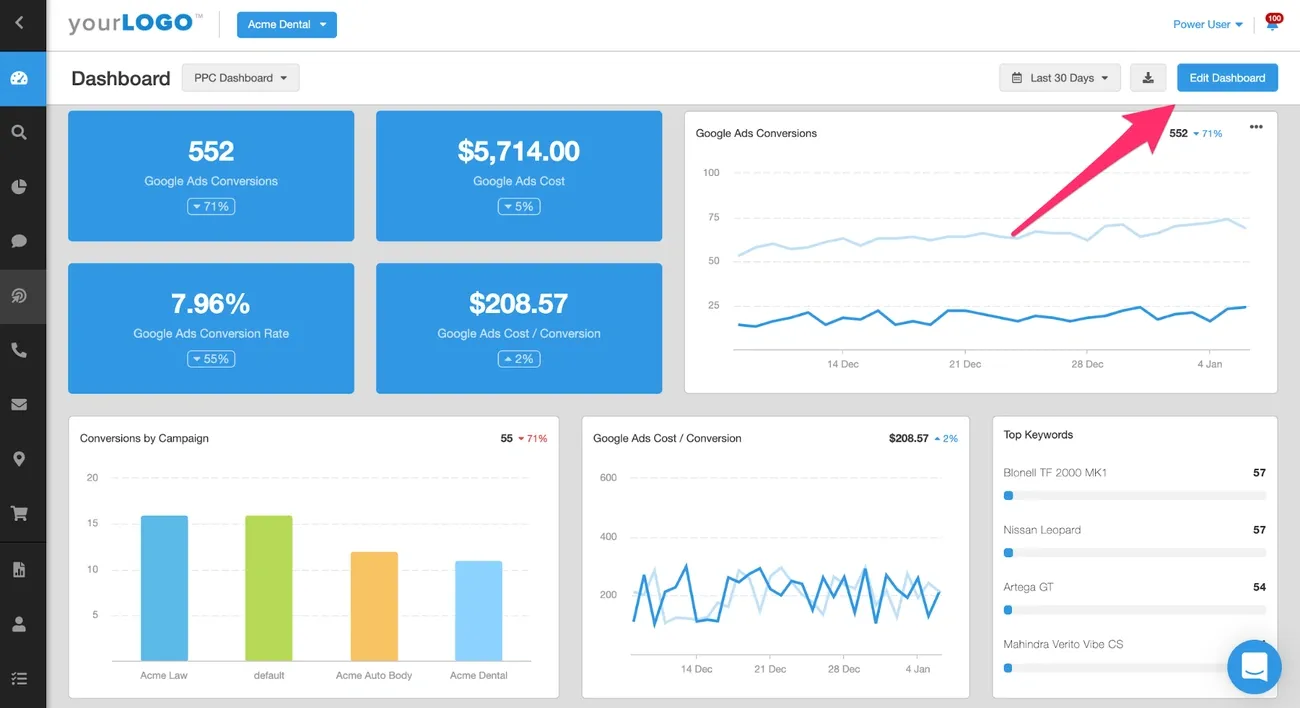
Image Source: AgencyAnalytics
Want to know the real impact of your budget approach? I’ve seen it firsthand – how you allocate your PPC budget affects way more than just controlling expenses. Daily and monthly budgets create completely different patterns in your performance metrics, and trust me, these differences can make or break your ROI.
Conversion pacing: daily vs monthly
Ever notice how your conversions come in fits and starts? There’s a reason for that. Budget structure directly impacts how consistently you get conversions throughout your campaign. With daily budgets, Google tries to average your spend across 30.4 days, but here’s the kicker – it might spend up to 200% of your set amount on high-traffic days. Sure, this flexibility sounds great in theory, but I’ve seen it create wildly inconsistent conversion patterns that make performance analysis a real headache.
Monthly budgets, on the other hand, let your daily spend fluctuate more naturally while still respecting your overall budget limits. I’ve found this approach works wonders for seasonal campaigns or ones that need time to build momentum before they really start converting.
For your campaigns to convert properly, you need enough budget to support at least 10 clicks daily. A 10% conversion rate is generally considered good for search campaigns. But let me be straight with you – throwing more money at poorly performing campaigns rarely fixes anything. I’ve made this mistake before. Increasing your budget won’t magically decrease your cost per acquisition if your traffic quality is garbage.
Budget exhaustion and ad visibility
That dreaded “Limited by Budget” status? It’s not just an annoying notification – it’s a direct signal that you’re missing opportunities. When this happens, your ads stop showing before reaching all potential customers, and you lose impressions, clicks, and conversions.
Here’s a simple reality check I give my clients: if Google recommends $1,000 monthly but you only allocate $500, you’ll get about half the clicks and leads you could be getting. Plus, tight budgets force you into making lower bids in keyword auctions, further weakening your competitive position.
The worst part? When your campaigns blow through their daily budgets too early, your ads just vanish until the next day. I’ve seen this inconsistent presence absolutely tank campaign momentum and wreck performance metrics like impression share, click-through rates, and conversion volume.
Click volume consistency over time
Getting steady click volume doesn’t happen by accident – it requires strategic budget pacing. Instead of applying the same daily caps across the board, I analyse performance patterns to optimise where and when the budget gets spent.
Let me share something I’ve learned from years of running campaigns conversion rates vary dramatically by time of day and day of week. If most of your leads come in between specific hours (like 8 a.m. to 2 p.m.), you’ll see substantially better results by strategically increasing bids and budget during these high-performing periods.
Look, continuous under-budgeting means missing growth opportunities, but over-budgeting just compounds your losses. What works best? I’ve found the sweet spot is making dynamic adjustments based on real-time performance signals, typically bumping high-performing campaigns by 10-20% increments. This measured approach gets you growth without breaking the bank.
Budget Optimisation Techniques
Want to know the real approach to PPC success? It’s not just about picking between daily or monthly budgets, you need strategic optimisation techniques that squeeze the most value from every dollar. I’ve managed countless campaigns and discovered that smart budget management can completely transform your results without spending an extra penny.
Using shared budgets for better control
Shared budgets in Google Ads are a turning point for streamlining your PPC management. You can allocate one budget across multiple campaigns, and Google automatically redistributes unspent funds from underperforming campaigns to those with better potential. When you pair this with portfolio bidding strategies, you get incredible flexibility while making sure all your campaigns with similar goals learn from each other.
What’s in it for you? The big advantages are pretty clear: you’ll save time on operational tasks, use your budget more efficiently, and maximise performance across all campaigns. Here’s a simple example: if you’ve set aside $100 daily split between two campaigns, and one only spends $40, Google can automatically shift the leftover $10 to the second campaign, making your overall results better.
Dynamic reallocation based on performance
Shifting your money around based on real-time performance is absolutely essential for effective budget optimisation. Instead of just increasing spend across everything equally (which is what most advertisers do), I recommend strategically moving budgets between:
- Branded campaigns (high-converting, lower-funnel)
- Non-branded search campaigns (high-growth potential)
- Remarketing campaigns (valuable repeat customers)
Keep an eye on your performance metrics to spot when adjustments are needed. Got campaigns with delayed conversions, like B2B lead generation? You’ll want to extend conversion windows in Smart Bidding settings past the default 30-day period, you can adjust from one to 90 days. This stops the algorithm from prematurely pulling budget from campaigns that simply have longer conversion cycles.
Avoiding ‘limited by budget’ status
That dreaded “Limited by Budget” status is more than just annoying, it’s telling you your campaign could be getting more traffic but can’t because of your daily budget. Here’s something that surprises most of my clients: you don’t always need to increase your budget to fix this, sometimes better optimization works better than throwing more money at it.
How do you fix it? Start by checking Google’s recommendations by clicking the “Limited by Budget” banner in your dashboard. But don’t just accept what Google says, their suggestions typically focus on incremental increases rather than what’s truly optimal for your business.
When you do need to scale budgets, go gradually, 10-20% daily increases rather than dramatic jumps. This gives bidding algorithms time to adjust without blowing your budget. Another trick I love: improving your Quality Score can actually lower your CPCs, making your existing budget stretch further.
Before you even think about increasing any budget, make sure your campaign fundamentals are rock-solid: properly set up conversion tracking, appropriate bidding strategies, and optimised campaign structure. I’ve seen it countless times, simply throwing money at underperforming campaigns almost never solves the real issues.
Bidding Strategy Alignment
You’ve got your budget approach figured out, but what about your bidding strategy? This is where things really get interesting.
Choosing the right bidding strategy dramatically affects how efficiently your PPC budget delivers results. Get this relationship right, and you’ll maximize ROI. Get it wrong, and you’ll waste money faster than you can say “limited by budget.”
Manual vs automated bidding under different budgets
I’ve worked with both manual and automated bidding, and here’s what I’ve learned: manual bidding gives you direct control over exactly what you’ll pay for each keyword click. No AI assistance, just your judgment. This hands-on approach pairs beautifully with daily budgets when you need to make quick adjustments. Your changes take effect instantly, so you can react right away to performance shifts or competitive pressures.
But let’s be honest – manual bidding becomes a nightmare as your accounts grow. Even the most experienced PPC managers get overwhelmed trying to manage hundreds or thousands of keywords across multiple campaigns. As one expert I work with puts it, “Manual bidding on multiple campaigns, advertising, and keyword lists can quickly become a cumbersome effort that no one individual can shoulder alone.”
On the flip side, automated bidding (especially Smart Bidding) analyzes tons of signals like device type, location, time of day, and user behavior to optimize bids in real-time. I’ve found this approach typically performs better with monthly budgets that give those machine learning algorithms the flexibility they need to work their magic.
Smart Bidding with daily vs monthly budgets
Smart Bidding is Google’s way of using machine learning to optimize for conversions in every auction. This includes strategies like Target CPA, Target ROAS, Maximize Conversions, and Maximize Conversion Value.
Here’s something important to remember: Smart Bidding adjusts your bids but doesn’t automatically shift budgets between campaigns. If one campaign runs out of daily budget, Smart Bidding won’t pull money from another campaign – you’ll still need to do that manually or set up automated budget rules.
Want to make Smart Bidding work better with daily budgets? I recommend:
- Using portfolio bidding strategies that apply common approaches across multiple campaigns
- Setting up shared budgets so your high-performing campaigns don’t run out of funds
From my experience, monthly budgets give Smart Bidding algorithms much more room to work, especially for campaigns with seasonal ups and downs or longer conversion windows.
Target CPA and ROAS considerations
Target CPA bidding automatically sets bids to hit your specified cost-per-action target. The system looks at historical data and contextual signals to predict how likely a conversion is, then adjusts your bids accordingly. For this to work well, your campaigns should have at least 30 conversions in the past 30 days.
When setting a target CPA, I always tell my clients to build in a 10-20% cushion. If your ideal CPA is $100, try setting it to $115 to give Google’s algorithm room to work effectively. Also, make sure your daily budget is at least two to three times your average CPA – this provides enough data for proper optimization.
Target ROAS works similarly but focuses on return on ad spend. It works best when you have at least 50 conversions within the past 30 days. The formula is simple: Conversion value ÷ ad spend × 100%.
Got a B2B lead generation campaign where conversions take weeks? Extend your conversion windows in Smart Bidding settings beyond the default 30 days. You can push it all the way to 90 days to prevent the algorithm from prematurely shifting budget away from campaigns that just have longer sales cycles.
Tools and Automation for Budget Management
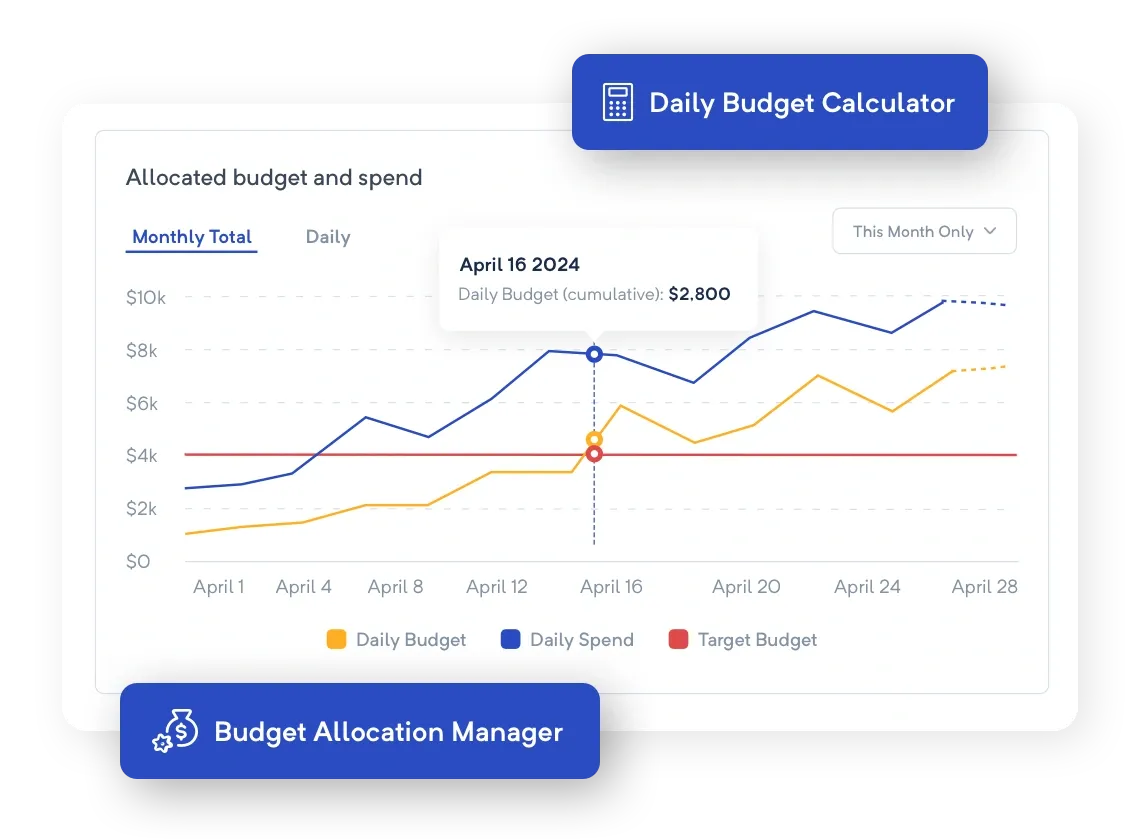
Image Source: Adalysis
Want to know what separates struggling PPC campaigns from highly profitable ones? In my experience, it often comes down to the tools you’re using. I’ve managed countless campaigns over the years, and I’ve found that having the right budget management tools makes all the difference between constantly fighting overspending and maintaining perfect budget control.
Using PPC budget calculators for planning
Tired of guessing how much your PPC campaigns might cost? That’s where budget calculators come in handy. These tools transform pure guesswork into actual science when planning your campaign expenses. They estimate your total campaign costs based on daily budget, CPC, and how long you’ll be running ads.
The best part? You can test different CPC scenarios before spending a single dollar. Want to know what happens if your clicks cost $3 instead of $2? Just plug it in and see the impact.
Most decent calculators make some assumptions to give you practical estimates. They typically figure you’ll need at least 20 clicks per day to gather enough data to evaluate your campaign properly. Many also include conversion projections based on average rates (usually around 4%) to help you estimate potential leads or sales.
Automated scripts to prevent overspending
Here’s something that catches advertisers off guard – Google can blow past your daily budget by up to 100%! That’s why automation isn’t just nice to have; it’s essential for strict budget control. Custom scripts offer a powerful solution by checking your spending hourly and automatically pausing campaigns when they hit your limits.
The most useful scripts I’ve found include:
- Hard Stop Scripts that slam the brakes once campaigns reach maximum daily budgets
- Reactivation scripts that automatically wake up paused campaigns at the start of the next day
- Budget cap scripts that ensure campaigns never exceed your monthly limits
For these to work properly, they typically need to run hourly, and they’ll apply labels like “Paused – Budget Overdelivery” so you can track which campaigns need to be reactivated.
Performance tracking and budget alerts
Preventing problems is great, but what about spotting opportunities? That’s where comprehensive tracking tools shine. The best platforms refresh your metrics hourly, so you can fix performance issues before they become disasters.
The tracking features I couldn’t live without include spend projections that forecast your monthly totals based on current pacing, plus anomaly detection that flags unusual spending patterns. Many platforms also let you set up custom budget alerts that notify you when campaigns reach specific spending thresholds.
If you’re managing multiple accounts (and who isn’t these days?), tools like NinjaCat offer automation that adjusts daily budgets automatically through AI-driven algorithms. This ensures your campaigns pace evenly throughout the month while preventing overspending.
Which Budgeting Style Delivers Better ROI?
After managing thousands of PPC campaigns across just about every industry, I’ve learned something important about ROI between daily and monthly budgets: there’s no one-size-fits-all answer. The best choice really depends on your specific business goals and how your campaigns typically perform.
Here’s what I’ve noticed in the real world. Monthly budgets typically work better for businesses with longer sales cycles. If you’re running B2B campaigns where conversions take weeks or months to materialize, a monthly approach gives those campaigns room to breathe. Trust me – if you’re adjusting budgets too frequently based on incomplete data, you’re probably cutting off campaigns before they’ve had a chance to show their true value.
On the flip side, daily budgets shine for businesses with consistent, predictable conversion patterns. If you’re managing a small business account with just a few campaigns and need tight control over your spending, daily budgets are your friend.
But here’s the thing: the ROI difference isn’t really about which timeline you choose. It’s about how dynamically you manage whichever approach you pick. What matters most is continuously shifting resources toward your high performers. I’ve seen businesses that actively manage their PPC budgets and optimise campaigns achieve up to a 200% increase in return on investment.
Want to maximise ROI regardless of which budget style you choose? Here’s my approach:
- Put 40-60% of your budget into top-performing platforms with tested ROI
- Keep 20-30% reserved for testing new strategies or platforms
- Direct 10-20% toward niche platforms that reach your specific target audiences
The key is your ability to spot performance signals and adjust quickly. When campaigns consistently hit or exceed your KPIs, scale up gradually in 10-20% increments. When performance drops despite your best optimization efforts, dial back the spending.
Oh, and don’t forget – true PPC ROI goes beyond just ROAS. The real calculation is: total revenue minus total expenses, divided by total expenses, multiplied by 100. This bigger-picture view considers your entire strategy rather than just looking at individual campaigns.
At the end of the day, the budgeting style that delivers better ROI is the one that gives you enough flexibility for your specific campaign goals while keeping you disciplined about optimization. That’s the sweet spot where budget management really shines.
FAQs
Q1. How often should I adjust my PPC campaign budgets?
It’s generally best to avoid frequent budget changes. For Google Ads, stability in budgets often yields better results. Make adjustments only when necessary, such as for seasonal demands or significant performance shifts. Gradual increases of 10-20% are recommended when scaling up successful campaigns.
Q2. What’s the difference between daily and monthly PPC budgets?
Daily budgets in Google Ads represent an average spend, allowing up to twice the set amount on high-traffic days. Monthly budgets offer more flexibility for campaigns with seasonal fluctuations or longer conversion cycles. The choice depends on your specific campaign goals and the nature of your business.
Q3. How can I prevent overspending in my PPC campaigns?
Utilize automated scripts that monitor spending hourly and pause campaigns when they reach predetermined thresholds. Implement budget cap scripts to ensure campaigns never exceed monthly limits. Also, consider using PPC budget calculators for planning and performance tracking tools with custom budget alerts.
Q4. What’s the impact of budget limitations on ad performance?
Budget limitations can reduce your advertising footprint, resulting in lost impressions, clicks, and conversions. When campaigns exhaust daily budgets prematurely, ads may disappear until the next day, damaging campaign momentum. To avoid this, ensure your budget supports at least 10 clicks daily for optimal conversion performance.
Q5. How does bidding strategy align with budget management?
Your bidding strategy should align with your budget structure. Manual bidding works well with daily budgets for immediate adjustments, while automated bidding (like Smart Bidding) typically performs better with monthly budgets. For optimal results, consider using portfolio bidding strategies and shared budgets to ensure high-performing campaigns receive adequate funding.

Runs paid acquisition across Google, LinkedIn, and Meta for B2B pipeline.