
Email Domain Blacklist Recovery: Step-by-Step Guide
Situation. Outbound was running fine. Then replies stopped overnight. Tools still show emails as sent, but SDRs are staring at empty calendars. Your email domain blacklist recovery starts the moment you realise the problem isn’t your copy.
Root cause. Mailbox providers judge senders on infrastructure, authentication, complaint rates, and sending patterns. A few high-volume campaigns with bad lists or aggressive volumes can push your domain or IP onto real-time blocklists like Spamhaus DBL, or trigger silent blocks at Gmail and Microsoft. Writing better subject lines does nothing at that point.
What we’ll cover. This guide walks through a complete email domain blacklist recovery plan: how to confirm listings, fix root causes before you request removal, handle Spamhaus specifically, and decide when to move to fresh subdomains. We’ll also share the same reputation-repair steps we use to move senders from high-risk back to the inbox.
How to Confirm Your Email Domain Is Blacklisted
Before doing anything else, confirm you’re actually dealing with blacklisting. Deliverability problems can look identical to list issues or content filtering.
Signs You’re Dealing with Blacklisting (Not Just “Bad Copy”)
The clearest signals are infrastructure-level, not engagement-level.
If opens and replies have dropped sharply across multiple inbox providers at once, that’s infrastructure. A single underperforming campaign in one vertical is not.
Look for specific SMTP bounce codes (5xx rejections with “blacklist” or “spam” in the message), consistent soft bounces across domains you’ve been sending to for months, and complaints from colleagues that internal emails are hitting spam.
Tools to Check Domain and IP Blacklists
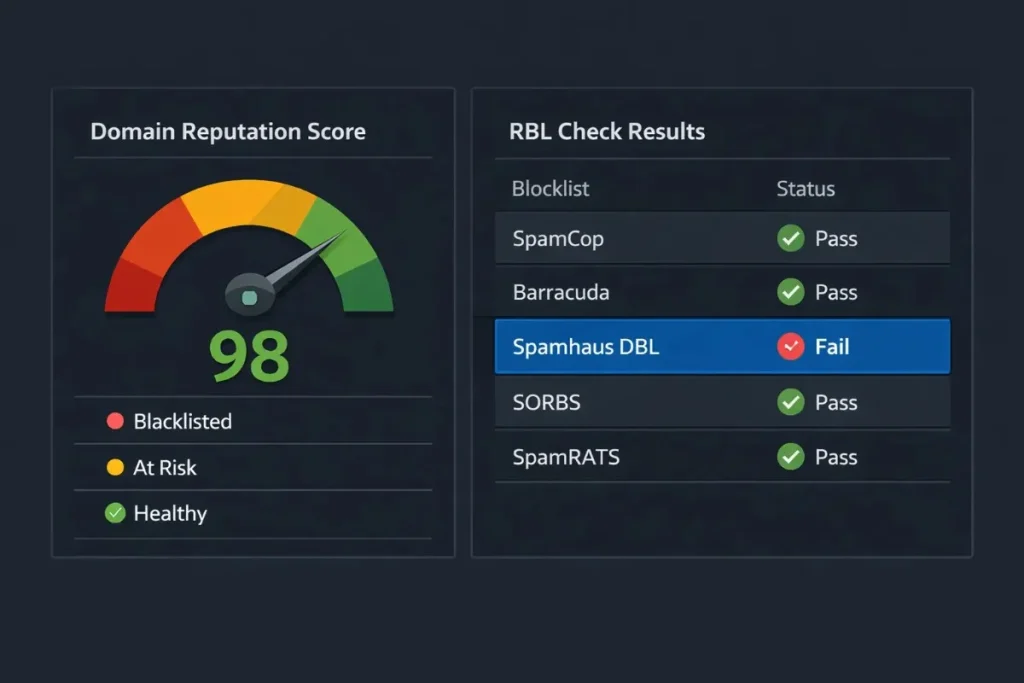
Run both your sending domain and your outbound IPs through MXToolbox’s blacklist checker. It scans over 100 public RBLs in one pass.
Then check Spamhaus directly, as it operates separately and many providers rely on it heavily. Also run an inbox placement test to see where emails actually land (inbox, spam, or missing) across Gmail, Microsoft, and others.
| Tool | What It Checks | Why It Matters |
|---|---|---|
| MXToolbox Blacklist | 100+ public RBLs | Fast multi-list scan |
| Spamhaus Lookup | DBL + ZEN | Most-referenced blocklist |
| Google Postmaster | Gmail sender reputation | Shows complaint rate trends |
| Inbox Placement Test | Live inbox vs spam split | Confirms deliverability impact |
A common mistake we keep seeing: teams run one tool, get a clean result, and assume they’re fine. Run at least three checks, because different providers rely on different lists.
Why Domains Get Blacklisted in 2026
This isn’t just about sending spam. The causes are more technical, and they’ve become stricter.
Complaint Thresholds and Bulk Sender Policies
Google, Yahoo, and Microsoft have all hardened their rules. The latest Gmail and Yahoo bulk sender requirements set the bar clearly: spam complaints must stay below 0.3%, full SPF/DKIM/DMARC authentication is required, and one-click unsubscribe is mandatory for senders above 5,000 emails per day.
Crossing those thresholds doesn’t just hurt deliverability. It can trigger a blacklisting event directly.
Here’s the rule we operate by: if any campaign cohort approaches 0.2% complaints, pause and investigate before sending more.
Technical Misconfigurations and Compromised Accounts
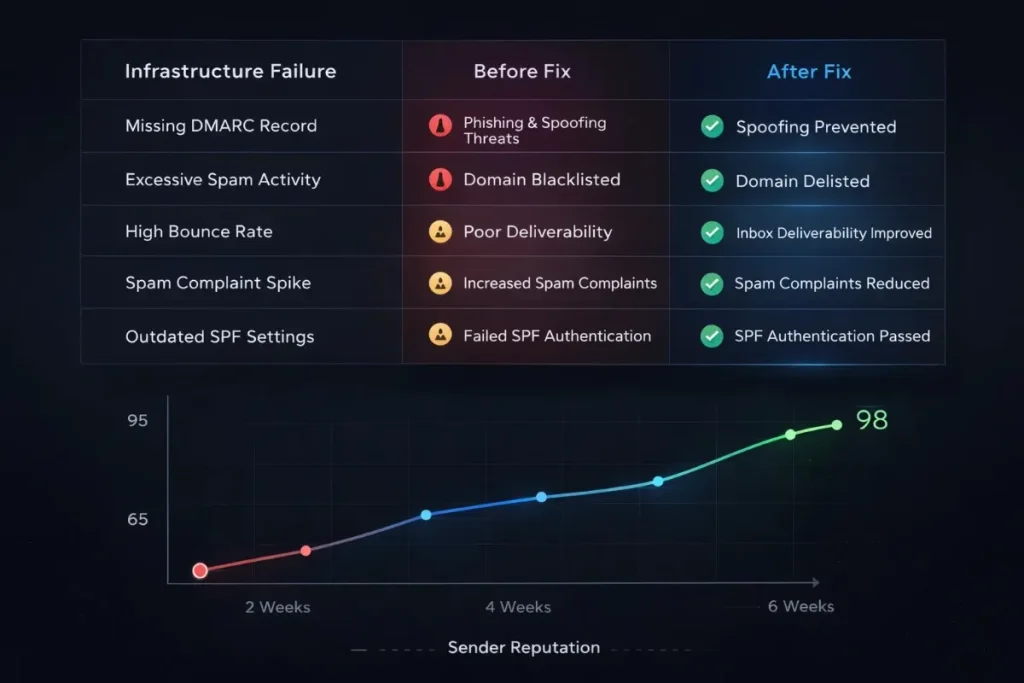
Missing or misconfigured authentication is one of the fastest routes to a blacklist. An open relay, a broken DMARC policy, or a compromised mailbox sending spam automatically can all trigger listings within hours.
Enable 2FA on all sending accounts and audit your SPF/DKIM/DMARC records now, not after the incident.
At Growleads, cold email infrastructure work is part of daily delivery. In one project, sender reputation improved from 65 to 98 by fixing SPF/DKIM/DMARC/BIMI, tightening list hygiene, and warming domains carefully. You can read the full sender reputation case study (65 to 98) if you want the detailed breakdown.
Step-by-Step Email Domain Blacklist Recovery Plan
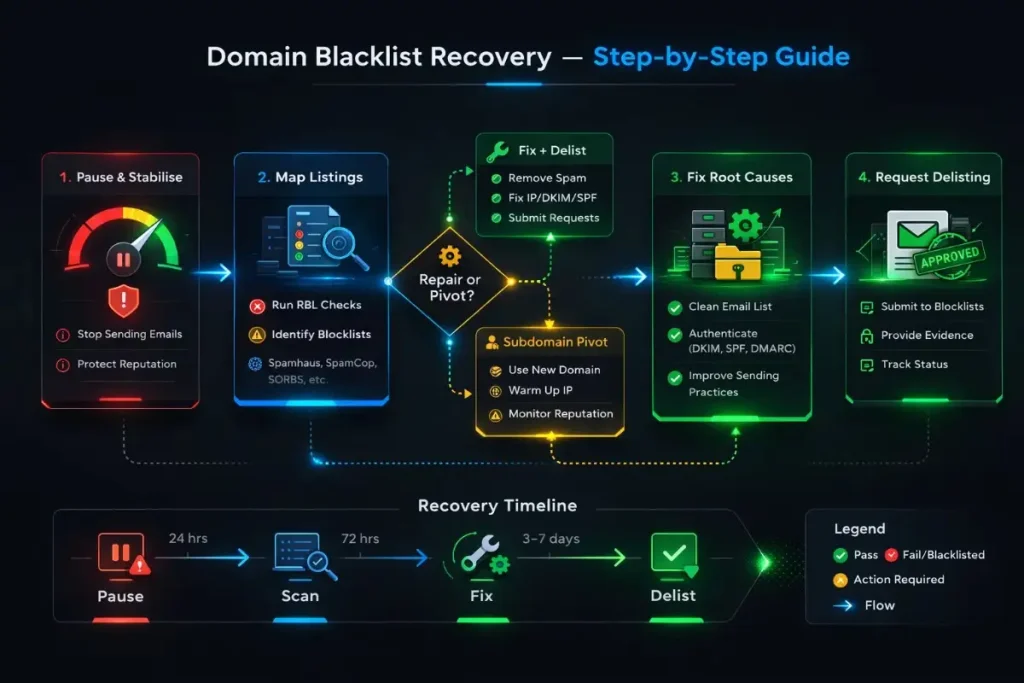
The industry guide to IP and domain blacklist removal (Folderly) maps this as a four-stage process. Here’s how we run it.
Step 1: Hit Pause and Stabilise
Stop adding negative signals immediately. Pause all non-essential outbound campaigns on the affected domain. Isolate the affected sending domain or subdomain from any shared infrastructure.
Brief your team and leadership now. This is a live incident. Treat it that way.
Step 2: Map Every Blacklist and Error Code
Pull your bounce logs from your ESP and sales engagement tool. Look for error codes: 550 or 421 codes with “blacklist” or “spam” language tell you exactly where you’re blocked.
Distinguish between public RBL listings (Spamhaus, SURBL, and others) and private ISP blocks at Gmail or Microsoft. They have different processes and timelines.
Step 3: Fix the Underlying Problems First
This is the step most teams skip, and it’s why they get re-listed within weeks.
Before you submit any email blacklist delisting request, complete these:
- Fix authentication: SPF, DKIM, DMARC all passing cleanly
- Secure compromised accounts and change passwords
- Clean your list: remove invalid emails, spam traps, and unengaged contacts
- Drop sending volumes to low, controlled levels
- Document every change you made and when
If hard bounces exceeded 2% on any send, halt that list entirely and re-verify the data before it touches any domain you care about.
Step 4: Execute Email Blacklist Delisting Requests
Each blacklist has its own process. Most use self-service forms where you explain what went wrong and what you fixed.
Be specific and honest. Vague requests get ignored or denied. Operators can see whether your sending patterns changed.
Expect 24 hours to a few days for straightforward cases. Serious or repeated offences can take longer, or be denied.
What we changed when this didn’t work: we shifted from general “better practices” explanations to specific, timestamped evidence of what was fixed and when. That’s what moves reviewers.
Removing Your Domain from Spamhaus DBL
Spamhaus DBL specifically flags domains associated with spam or phishing. Because so many providers query it, a DBL listing often means near-universal blocking.
How Spamhaus DBL Works and Why It Hurts
Spamhaus lists domains, not just IPs. If your sending domain appears in DBL, recipients’ mail servers reject or junk your emails before they’re evaluated on any other factor.
The detailed walkthrough of Spamhaus DBL removal (GlockApps) confirms that genuine fixes are typically reviewed within hours to a couple of days, but that depends on whether the root cause is actually resolved.
Preparing a Strong Spamhaus Delisting Request
Use the Spamhaus DBL lookup tool to confirm your exact listing status. Then access the delisting form and include:
- What triggered the listing (be direct, they can see the data anyway)
- Exactly what you fixed and when
- What safeguards are now in place to prevent recurrence
- Evidence that the sending pattern has changed
Do not submit the form before the fixes are done. Spamhaus tracks repeat requests and treats them as evidence of continued abuse.
When to Repair vs. When to Pivot to New Domains
This is the decision most guides avoid. Here’s how we think about it.
The Repair vs. Pivot Decision
| Situation | Recommended Action |
|---|---|
| First-time listing, minor list | Repair, fix auth, request delisting |
| First-time listing, compromised account | Repair + move cold outbound to subdomain |
| Repeated listings, same domain | Move outbound to subdomains immediately |
| Main domain repeatedly blacklisted | Subdomain isolation + IP reputation repair |
| Severe abuse history, multiple lists | Fresh infrastructure, retire sending domain |
For IP reputation repair specifically: if your shared sending IPs are the issue and you’re on a shared ESP, contact their deliverability team. If you’re on dedicated IPs, the fix follows the same pattern: pause, remediate, re-warm.
Protecting the Main Corporate Domain with Subdomains
Running cold outbound from a dedicated subdomain (like mail.company.com or outreach.company.com) means that even if a campaign goes badly wrong, your primary domain’s reputation stays clean.
Transactional emails, internal communications, and billing emails never get caught in the damage. We cover the full implementation in our subdomain strategy for protecting your main domain.
Safe New Domain and Subdomain Setup and Warming
Any new sending domain needs full SPF/DKIM/DMARC configured before a single email goes out. Treat auth failure as a deployment blocker, not an optional step.
Start at 20 to 30 emails per day per mailbox. Increase slowly over 4 to 6 weeks using highly engaged seed contacts first. Never jump straight to full campaign volume from a cold domain.
Rebuilding Sender Reputation After Delisting
Delisting is the start, not the end. Your email sender reputation score needs to be rebuilt deliberately.
List Hygiene and Engagement Guardrails
Remove all contacts who haven’t engaged in the last 90 days. Verify your list with a data cleaning tool before re-sending. If you’re running cold outreach, use only verified, recently sourced data.
Segment by engagement tier. Send first to your most active recipients. Only expand to colder segments once your reputation metrics stabilise.
Monitoring Reputation and Inbox Placement
Set up Google Postmaster to track your Gmail complaint rate and domain reputation continuously. Add a third-party inbox placement test on a weekly cadence.
Build an internal dashboard that flags when hard bounces pass 1.5% or complaint rate approaches 0.15%. Catching drift early prevents the next incident.
This same reputation-first approach underpins our B2B cold email infrastructure and deliverability service, which is built around subdomain isolation, authenticated sending, and engagement-driven warmup.
Preventing the Next Blacklist Incident
The best time to build this is right after recovery, when the pain is fresh and leadership will fund the work.
Governance: Policies, Thresholds, and Reviews
Document your sending policies. Write down: maximum daily volume per mailbox, bounce cut-off (halt at 2%), complaint cut-off (investigate at 0.2%), approved tools list, and who owns each decision.
Run a quarterly deliverability review. Check authentication records, sending patterns, list quality, and reputation scores across all channels. Include GDPR- and CCPA-aligned outreach practices in your data sourcing review.
When to Bring in External Deliverability Help
If you’re facing repeated listings, managing complex multi-domain setups, or running outbound that directly drives pipeline, it’s often more efficient to bring in a team that handles this daily.
Signs it makes sense to bring in help: two or more domains affected, blacklists reappearing after delisting, or your in-house team spending more than a week on remediation without clear progress.
What to Do Next
If you’re in a live incident right now, here’s the short version:
- Pause campaigns on the affected domain immediately
- Run MXToolbox, Spamhaus DBL lookup, and an inbox placement test
- Pull bounce logs and identify the error codes
- Fix authentication and list hygiene before requesting delisting
- Set up Google Postmaster and commit to weekly monitoring going forward
If you’d like us to audit your sending setup and map out a recovery or prevention plan, get in touch with the Growleads team and we’ll walk through what we’d check first.
How do I quickly check if my email domain is blacklisted?
Run your sending domain and outbound IPs through MXToolbox’s blacklist checker, which scans over 100 public RBLs in one pass. Then check Spamhaus DBL directly, as many providers query it separately. Cross-reference with bounce codes from your ESP and an inbox placement test to confirm whether the block is active and where it’s hitting.
What is the fastest way to remove my domain from Spamhaus DBL?
Fix the issues first, then submit the Spamhaus DBL delisting form with specific, honest detail about what changed and when. Vague requests get ignored. If your fixes are genuine and documented, Spamhaus typically reviews within hours to a day. Submitting before the problems are resolved will get the request denied and may make future requests harder.
How long does email domain blacklist recovery usually take?
Minor first-time listings can clear within 24 to 72 hours once root causes are fixed and delisting is requested. More serious incidents, repeated offences, or listings on multiple blocklists can take weeks. Some severe cases won’t be accepted for delisting at all, which is why fixing the infrastructure and moving to subdomains is often the parallel path worth taking.
Can I keep using my main domain after it gets blacklisted?
Often yes, particularly for a first incident where you’ve fixed the root cause and requested delisting. But future cold outbound should move to dedicated subdomains to isolate the risk. Keeping your main domain clean for transactional email and internal communications is the smarter long-term setup regardless of whether a blacklisting event has occurred.
Do I need a completely new domain to fix my email deliverability issues?
A new domain is a last resort, not a first step. Start with remediation, subdomain isolation, and reputation rebuilding. Moving to a fresh domain only makes sense when the main domain has a severe, repeated abuse history and delisting attempts have failed. Jumping to a new domain without fixing root causes means you’ll repeat the same incident.
What causes most email domains to get blacklisted today?
The main drivers are poor list quality (invalid emails and spam traps), high spam complaint rates, missing or broken SPF/DKIM/DMARC, compromised accounts sending automated spam, and aggressive sending volumes that breach bulk sender thresholds. Under current Gmail and Yahoo enforcement, missing authentication alone can be enough to trigger filtering or blacklisting.
What should I fix before I ask to be delisted from a blacklist?
Secure all sending accounts with 2FA, implement and verify SPF/DKIM/DMARC, clean your contact list (remove invalid, unengaged, and trap-risk addresses), lower your sending volumes, and document every change with timestamps. Blacklist operators can see whether your behaviour changed. Without that evidence, your request won’t be taken seriously.
How do I rebuild sender reputation after getting off a blacklist?
Restart with low daily volumes directed at your most engaged contacts first. Keep hard bounces under 1% and spam complaints well below 0.2%. Monitor Google Postmaster and inbox placement tools weekly. Expand volume slowly over several weeks only as reputation scores improve. Treat delisting as the start of a probation period, not a clean slate.
What tools can a Tech/Ops Lead use to monitor domain reputation?
Google Postmaster is the most direct tool for Gmail reputation and complaint rate data. Combine it with regular RBL checks (MXToolbox), a third-party inbox placement test, and your ESP’s bounce and complaint reporting. Building a simple internal dashboard that flags threshold breaches before they escalate is worth the setup time.
When should we bring in an agency to help with blacklist recovery?
If multiple domains are affected, blacklists keep reappearing after delisting, or email outbound is a significant revenue channel, external help is usually faster and more cost-effective than handling it in-house. A team that manages deliverability infrastructure daily will move through diagnosis, remediation, and monitoring setup significantly faster than an ops team doing it for the first time.

Builds the demand intelligence, automation, and deliverability systems behind Growleads pipeline.