
Cold LinkedIn Messages That Actually Get Replies in 2026
Getting a response to a cold LinkedIn message feels like winning the professional networking lottery these days. Connection requests and outreach attempts often vanish without any replies. Most people make common mistakes. They use generic templates and obvious sales pitches. Their messages clearly show they want something from the recipient.
The good news is that writing effective LinkedIn messages doesn’t need any special powers or insider connections. I tested and refined my approach to cold outreach on LinkedIn and found that there was a formula that works. My best cold LinkedIn message templates and strategies consistently get responses from high-level decision-makers. This piece covers everything you need. You’ll learn about profile optimization before sending messages and follow-up techniques that don’t feel pushy. These tested tactics will reshape the scene of your LinkedIn message strategy for 2025 and beyond, whether you’re prospecting, job hunting, or building your network.
Get your profile ready before messaging
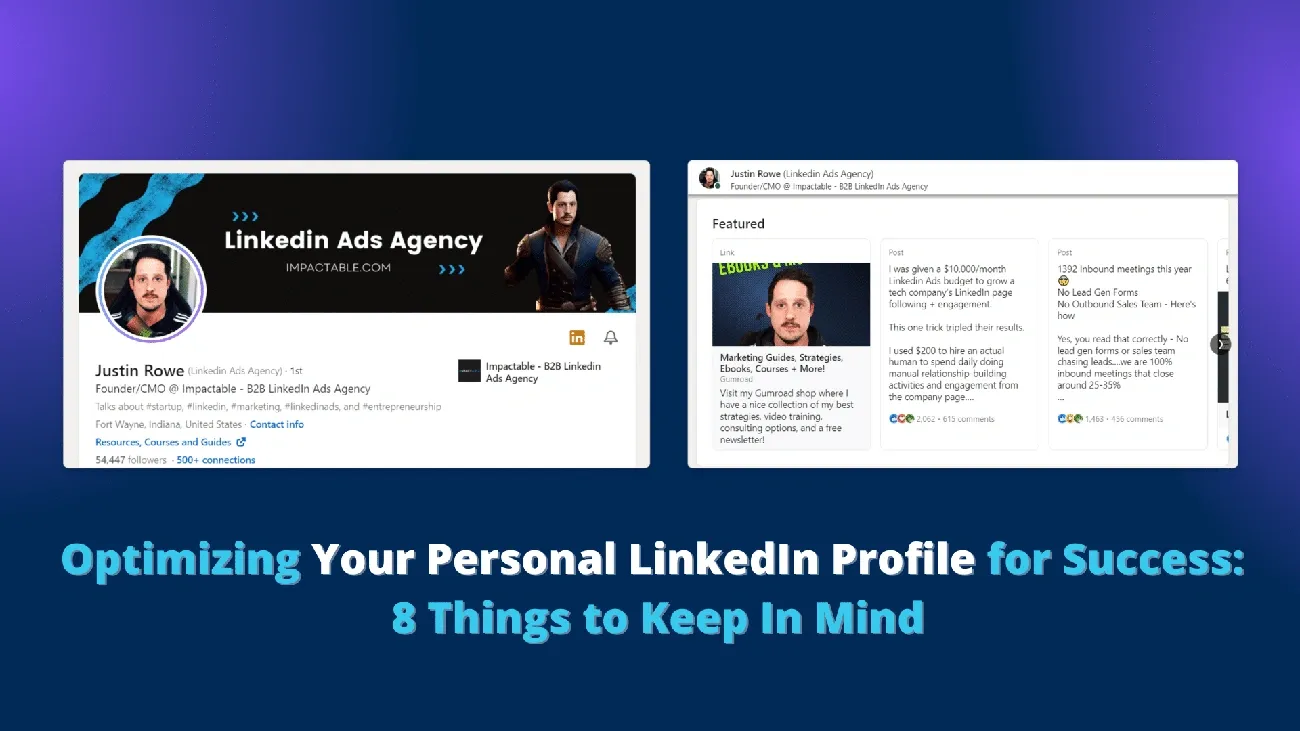
Image Source: Impactable
Polish your profile before sending those cold LinkedIn messages. Your LinkedIn profile makes your first digital impression, and prospects will check it out before they decide to respond. Just like meeting someone in person, you want to make a great first impression online.
Optimize your headline and summary
LinkedIn gives you 220 characters in your headline to make your mark. Don’t just list your job title – use this space to show your unique value. LinkedIn data shows that people see your headline first, and it’s the only part that stays visible without clicking “See All” in search results.
A headline that grabs attention should include:
- Your current role or profession
- Your main skills or expertise
- What makes you special
- A standout achievement (if you have room)
Your summary (the “About” section) gives you 2,600 characters to share your professional journey. Here’s where you can define yourself beyond just dates and titles. Make your first sentence count – especially the first 265-275 characters that show up before someone clicks “See More”.
Your summary should reveal what drives you professionally. Keep your current role description simple and spotlight your biggest wins. Stories make you memorable, so tell them well and end with a clear next step.
Add a professional photo
Profiles with photos get up to 21 times more views, 36 times more messages, and 9 times more connection requests than those without. But not just any photo will do – you need a professional headshot where your face takes up about 60% of the frame.
A good headshot builds trust and credibility. People make up their minds about you within milliseconds of seeing your face. Your photo must:
- Look current and like you do now
- Have good lighting and a clean background
- Show you dressed right for your field
- Feature a real smile
Your photo also helps create a consistent image across your online presence, which builds your personal brand. A profile without a photo might look fake or incomplete to potential connections.
Showcase relevant experience
Make your experience section reflect your resume but focus on achievements. Profiles with more than one position listed get viewed up to 29 times more often. Skip the boring job duties – show your results with real numbers.
Tips to make your experience section stand out:
- Connect each job to the company’s LinkedIn page (adds their logo and helps your ranking)
- Choose strong verbs like “drove,” “initiated,” or “secured”
- Write short, powerful bullet points
- Add relevant skills to each role
- Show achievements your target audience cares about
Your experience isn’t just about full-time jobs – add freelance work, side projects, and volunteer roles that show off your skills. LinkedIn now groups your consecutive positions at the same company automatically, which shows your growth and loyalty.
Include recommendations
Think of recommendations as personal reviews of your work. Unlike quick-click endorsements, these require someone to write about their experience with you.
You don’t need many – two or three solid recommendations work well. The best ones come from people who:
- Worked with you directly (at least during one project)
- Have respected positions (higher-ups are better)
- Maintain strong LinkedIn profiles themselves
Ask for recommendations right after working with someone while your work is fresh in their memory. Tell them what specific aspects of your work you’d like them to highlight. These recommendations show up on your profile and prove your skills and expertise.
A well-optimized profile with these four elements will boost your chances of getting responses to cold messages. People trust and respond better to someone with a complete, professional profile that proves their credibility before the conversation starts.
Find and qualify the right leads
The success of LinkedIn outreach depends on messaging the right people. A great profile and message template won’t help if you reach out to the wrong prospects. Here’s how you can spot and qualify the perfect leads for your cold LinkedIn messages.
Use LinkedIn filters effectively
LinkedIn’s advanced search lets you zero in on potential leads with amazing precision. The platform’s basic filters cover location and job title. LinkedIn Sales Navigator gives you over 50 specific attributes to work with.
These key parameters make LinkedIn’s advanced search filters powerful:
- Location to reach prospects in specific geographic regions
- Industry to reach professionals in relevant sectors
- Job Title to find decision-makers with proper authority
- Company Size to match your ideal customer profile
- Connection Degree to focus on second-degree connections as warmer leads
The right combination of multiple filters gives you the most accurate results. To name just one example, looking for marketing directors at SaaS companies with 50-500 employees in specific areas will get you better leads than wider searches.
Define your ideal customer profile
You need a detailed ideal customer profile (ICP) before sending cold messages. Your ICP shows which companies will get the most value from your offering and give the highest value back to your business.
A look at your current top customers helps develop an effective ICP. Look for shared traits like:
- Company size and annual revenue
- Number of employees
- Industry and geographic location
- Key pain points and challenges
Your definition of a “best customer” depends on your goals. Look at factors like profitability, satisfaction levels, renewal rates, or referral frequency. Your best customers’ buying decisions will help you spot similar qualities in potential leads.
Your ICP works as a guide for your prospecting strategy. A clear ICP helps you spend less time on unqualified leads and create messages that hit home.
Track lead activity and engagement
The way potential leads interact with LinkedIn content shows valuable qualification signals. Sales Navigator makes this easier with up-to-the-minute alerts about leads changing jobs, sharing content, or engaging with posts.
Good tracking looks at:
- Connection acceptance rate to see initial interest
- Engagement rate on your content to see what works
- Conversion rate from connection to real conversation
- ROI from your LinkedIn lead generation work
LinkedIn’s Custom Lead Lists give you a great way to keep tabs on outreach status. You can arrange leads by recent activity date and see who you’ve contacted, who responded, and which leads need immediate follow-up.
Teams using CRM systems can get a complete view of the prospect’s experience by integrating LinkedIn activity. Adding “LinkedIn” as a lead source in your CRM helps track opportunities that started on LinkedIn.
The quality of your cold LinkedIn outreach will improve substantially when you mix effective filtering, a clear ICP, and steady tracking. This groundwork means your messages will reach the right people at the right time, which boosts your chances of getting meaningful replies.
8 cold LinkedIn message examples that work
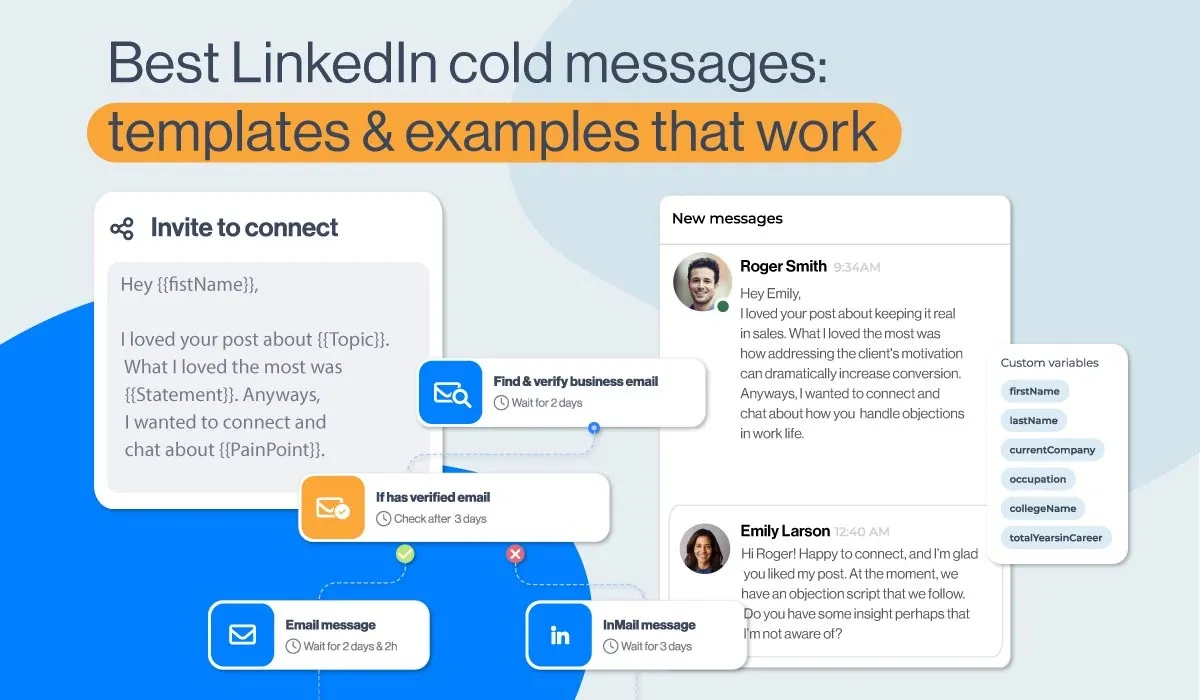
Image Source: Skylead
Your profile looks great and you’ve found the right people to connect with. Let’s head over to cold message templates that actually get responses. My analysis of hundreds of successful outreach messages revealed eight templates that reliably generate replies.
1. Profile view follow-up
Someone viewing your LinkedIn profile gives you a natural chance to start a conversation. You can begin the dialog without coming across as pushy:
“Hi [Name], I noticed you recently checked out my LinkedIn profile, and I thought it would be a great opportunity to connect. As fellow [Industry] professionals, I’m excited to share insights and learn from your experiences. I was particularly impressed by your work at [Company] and would love to hear more about your approach to [specific topic].”
This follow-up message gets acceptance rates up to 63% because it builds on previous interaction.
2. Shared group message
Common LinkedIn groups create an instant connection. This method works by establishing common ground:
“Hi [Name], I saw that we’re both members of the [Group Name] group. I’ve been following your comments on [Topic] and found your viewpoint insightful. I’d love to connect and possibly exchange ideas about [Industry Challenge]. Let’s stay in touch!”
Messages that mention shared groups can reach acceptance rates of 63% by highlighting community connections.
3. Post engagement message
Someone’s engagement with your content opens up a warm outreach chance:
“Hello [Name], Thank you for your thoughtful comment on my recent post about [Topic]. Your point about [Specific Aspect] appealed to me. I’d love to continue our discussion and learn more about your experience with [Related Topic]. Would you be open to connecting?”
This template builds on existing interest and feels more natural than cold outreach.
4. Event-based outreach
Messages based on events connect with people already interested in solving relevant problems:
“Hey [Name], I noticed you attended [Event Name]. What did you think about [Event Takeaway]? I found the discussion around [Topic] particularly valuable for addressing [Industry Challenge]. Let’s connect and continue the conversation!”
This approach creates context by referencing shared experiences.
5. Direct pitch with social proof
A direct approach becomes more credible with social proof:
“Hi [Name], I noticed you work as [Position] at [Company]. We recently helped [Similar Company] with [Problem], resulting in [Specific Result]. I was wondering how you’re currently approaching this challenge at your company. Would you be interested in a brief conversation about this?”
Messages that include specific case studies get response rates up to 35% by showing tested value.
6. Humor-based message
The right touch of humor can make your message stand out:
“How many [Job Title] does it take to screw in a light bulb? None – they’ve automated it. 🙂 Just kidding, [Name]. But if you really wish to automate almost every part of your [Industry] workflow, let’s connect. I’d like to show you something that could make your life easier.”
Humor-based templates get 53% acceptance and 27% reply rates when they match the industry context.
7. Referral or intro request
Mutual connections boost trust and likelihood of response:
“Hey [Name], [Mutual Connection] sent me your profile as they think you’re the right person to help with my research about [Topic]. Let’s connect and talk if you’re up for it. I’d value your viewpoint based on your experience at [Company].”
This template uses existing relationships to warm up cold outreach.
8. Value-first message
Genuine interest in someone’s work creates a positive first impression:
“Hi [Name], I noticed you work as [Position], so I wanted to reach out and chat about your role. I’m curious what [Strategy] has delivered the best [Result] from your experience? I’d love to learn from your insights.”
This approach establishes meaningful connections by giving before asking.
Note that personalization makes these templates work better. Adapt each message to match the recipient’s profile, company, and situation to improve your response rates.
How to write a cold message that gets replies
Writing cold LinkedIn messages that work isn’t complicated, but you need the right approach. The messages that get enthusiastic replies stand out from those that get ignored because of a few simple elements. Here’s how to create LinkedIn messages that actually get responses.
Start with a strong hook
Your opening line works like a thumbnail for cold outreach. This first impression determines whether someone reads your message or scrolls past it. A unique first line creates curiosity and makes people stop scrolling.
“Hi [Name]” or “Hope this finds you well” won’t cut it anymore. These boring starts look just like every other message. Try these hooks that build real curiosity instead:
- “I know this is random…”
- “You seemed like the best person to reach out to for this…”
- “I was today years old when I found out [unexpected insight about their company]…”
Research shows that hooks that provoke emotional responses work better because they trigger people’s motivation to read more.
Mention something specific
The simple truth is personalization wins conversations. Your response rates climb higher when you make your outreach more personal. Show your genuine interest by mentioning:
- Their working or volunteering experience
- Content they’ve shared or participated in
- Groups you’re both members of
- Events you’ve both attended
- Mutual connections
This strategy shows you’ve invested time to understand their work, and this is a big deal as it means that they’re more likely to respond. Think of it like meeting someone at a networking event – you want to make your point while showing you’ve done your research.
Keep it under 300 characters
LinkedIn has a strict 300-character limit on connection messages. This count includes spaces, letters, symbols, and emojis. Your message gets cut off if it runs longer, which could ruin your careful writing.
This limitation actually helps you. Boomerang’s research found that sales emails written at a third-grade reading level got 36% more opens and 17% more responses than college-level writing. Busy professionals appreciate short, clear messages and respond more often.
End with a soft CTA
Your message needs a clear next step. People won’t take action unless you tell them what to do. Notwithstanding that, your first message shouldn’t sound like an obvious sales pitch.
Soft CTAs feel more natural and give control to the reader. Try these options:
- “Would it be alright if I shared a few ideas about [X Problem]?”
- “Open to learning how this might work for you?”
- “Worth a chat?”
These gentle approaches help book more meetings because prospects feel they’re just exploring possibilities. You can be more direct when addressing bigger pain points – but keep that natural tone that respects their choice.
Follow-up strategies after no response
Not getting a response to your LinkedIn message doesn’t mean rejection. Most people respond between the second and fourth follow-up, which makes your follow-up strategy more crucial than your original outreach.
When to follow up
The right timing makes all the difference in follow-up messages. Research shows you should send your first follow-up 3-5 business days after your original message. This gives people enough time to respond without letting the conversation fade. Your second follow-up should go out 5-7 business days after the first one.
You should avoid using a 7-day gap between messages because they’ll land on the same weekday. Different days get different levels of engagement. You might need to speed this up for urgent matters, but patience usually works better.
What to say in your second message
Never start your follow-up with “Did you get my previous message?” Each message needs to bring something new to the table. Here are some approaches that work:
- Acknowledge their busy schedule: “I understand things get busy, and I wanted to ensure my previous message didn’t get lost in the shuffle.”
- Share fresh industry insights or a relevant article
- Show a case study or success story that relates to their challenges
- Ask a thought-provoking question about their business
Your follow-up should be short, 75-100 words maximum. Today’s professionals quickly scan messages on mobile devices, so being concise matters.
How many follow-ups are too many
Being persistent helps, but there’s a fine line between determined and pushy. Most experts agree that 2-3 follow-ups hits the sweet spot. Some research suggests 3-5 follow-ups can work well since most responses come between the second and fourth try.
Sending more than three messages increases your chances of being marked as spam by a lot, which can hurt your sender reputation. After reaching your follow-up limit, it’s best to move on. You can try a different approach months later, such as using LinkedIn InMail if you started with connection requests.
A well-crafted, valuable second message beats five generic check-ins every time.
Using automation without losing the human touch
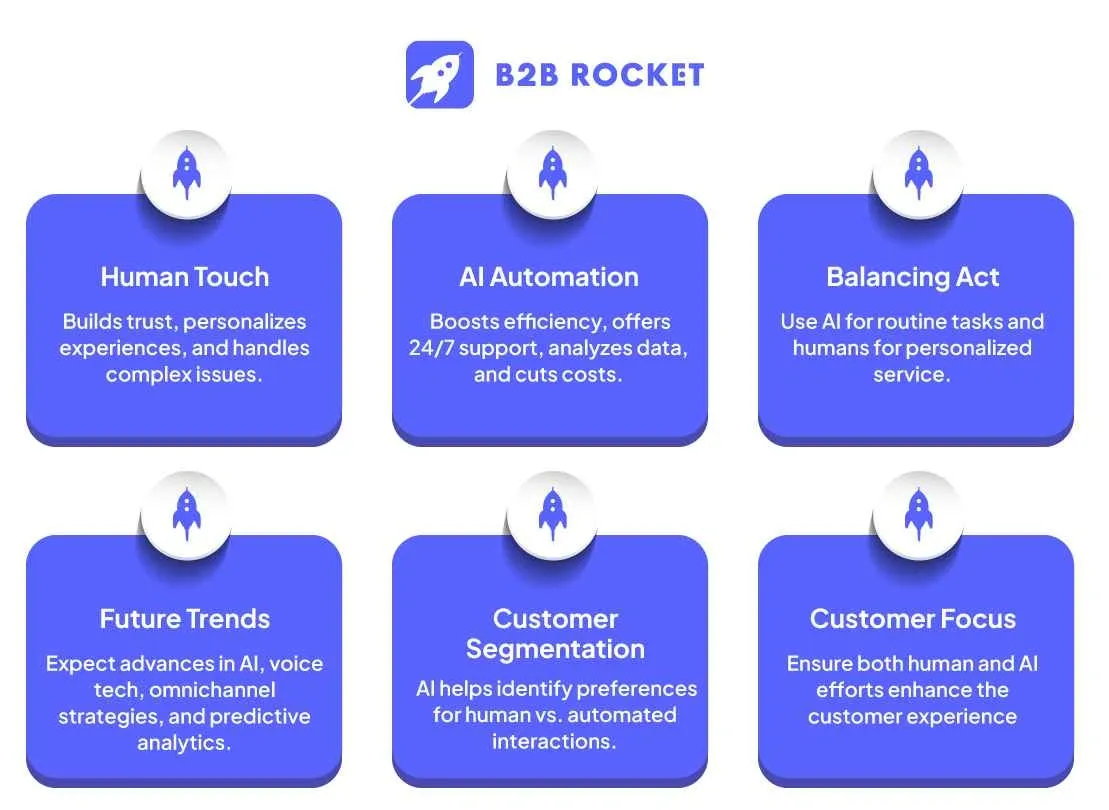
Image Source: B2B Rocket
LinkedIn outreach efforts can scale with automation tools, but many professionals fear losing their authentic touch. Success comes from knowing which tasks to automate and when you need a personal touch.
When to automate
We focused on automating basic networking tasks that don’t need human judgment. Research shows good automation has:
- Profile views to boost visibility
- First connection requests
- Follow-ups with non-responding prospects
- Outreach timing optimization
You should never automate real conversations or responses to questions. An automation expert puts it well: “At its core, social selling is about building a relationship and engaging a prospect. So, you shouldn’t automate conversations between you and your leads”. Your personal touch becomes crucial once someone responds.
How to personalize at scale
Automated outreach needs personalization. Studies show personalized connection requests get accepted more often. These approaches work well:
- Dynamic placeholders that grab details from prospect’s profiles (first name, company name, job title)
- Mentions of their recent wins or activities
- Different message versions to test what strikes a chord best
Custom visuals can improve cold outreach reply rates by up to 55%. Adding the recipient’s photo or company logo makes compelling calls-to-action.
Tools that support smart outreach
Some platforms excel at keeping the human touch while scaling outreach:
- Expandi runs automatic scenarios based on prospect’s behavior and adds personalized videos and images to boost engagement
- Dux-Soup handles multi-stage outreach with up to 11 post-connection actions that stop when someone replies
- LinkedIn’s native tools help you retarget people who engaged with your content, checked your profile, or connected with your company page
Good automation creates more time for human interaction rather than replacing it. As one expert says, “Automation doesn’t mean you spam the same message to everyone”. The best systems help you start connections while giving you time for meaningful talks.
Conclusion
Cold LinkedIn outreach shouldn’t feel like shouting into the void. This piece explores how good prep work and smart messaging can reshape your connection results. A well-optimized profile creates your digital first impression, so it’s crucial to get it right before you start reaching out. Finding and qualifying the right people helps you target those most likely to respond.
Your messaging strategy needs to build on solid foundations. Personalization beats mass messaging every time. Short messages work better than long explanations in your original outreach. Soft CTAs start conversations instead of pushing for quick commitments.
These eight message templates create real connection points that work. But they’re just the starting point, your own voice and research will determine how well you do.
Getting results takes patience, while respecting boundaries stays crucial. Most people who say yes do it after follow-up messages. Just space them right so you don’t come across as desperate.
Automation streamlines your outreach when you use it wisely. The best approach uses tech for repetitive tasks but keeps the human element in real conversations. This lets you connect with more prospects without losing the authentic touch that builds meaningful relationships.
Success on LinkedIn comes down to showing respect, for time, interests, and boundaries. Your response rates improve when you treat cold messaging as the start of a potential relationship rather than just another sales task. You now have the tools and templates to turn ignored messages into engaging conversations that move your professional goals forward.
Boost replies. Book more meetings. Try our tested outreach system at Growleads.io.
FAQs
Q1. What is a good response rate for cold LinkedIn messages?
Response rates for cold LinkedIn messages can vary widely, but a well-crafted campaign can achieve reply rates of 10-30%. Highly personalized messages to carefully targeted prospects may see even higher response rates.
Q2. How can I write an effective cold LinkedIn message?
An effective cold LinkedIn message should be brief (under 300 characters), personalized to the recipient, mention something specific from their profile or recent activity, and end with a soft call-to-action. Avoid generic greetings and focus on providing value rather than making an immediate sales pitch.
Q3. Is it better to send a connection request or InMail for cold outreach?
For initial cold outreach, sending a personalized connection request with a brief message is often more effective than InMail. This approach feels less intrusive and allows you to build a relationship before making a direct pitch. However, InMail can be useful for reaching out to people outside your network.
Q4. How many follow-up messages should I send after no response?
It’s generally recommended to send 2-3 follow-up messages if you don’t receive a response to your initial outreach. Space these follow-ups 3-7 business days apart, and ensure each message provides new value or information to the recipient.
Q5. Can I use automation tools for LinkedIn outreach without losing authenticity?
Yes, you can use automation tools for certain aspects of LinkedIn outreach while maintaining authenticity. Automate repetitive tasks like profile viewing and initial connection requests, but always personalize your messages and handle actual conversations manually. This approach allows you to scale your efforts while preserving the human touch in your interactions.

Builds the demand intelligence, automation, and deliverability systems behind Growleads pipeline.