
5 Reminders That Save Deals When No-Shows Kill Pipeline
6.5% of your scheduled meetings never happen. For enterprise sales teams running 100 demos monthly, that’s 6 to 23 lost revenue conversations, wasted marketing spend, and compressed pipeline velocity. B2B sales organizations lose between $100,000 and $500,000 annually because booked meetings simply disappear. The problem has quietly shifted from prospect behavior to a systems engineering issue, and it’s costing VPs of Sales millions in lost quota attainment.
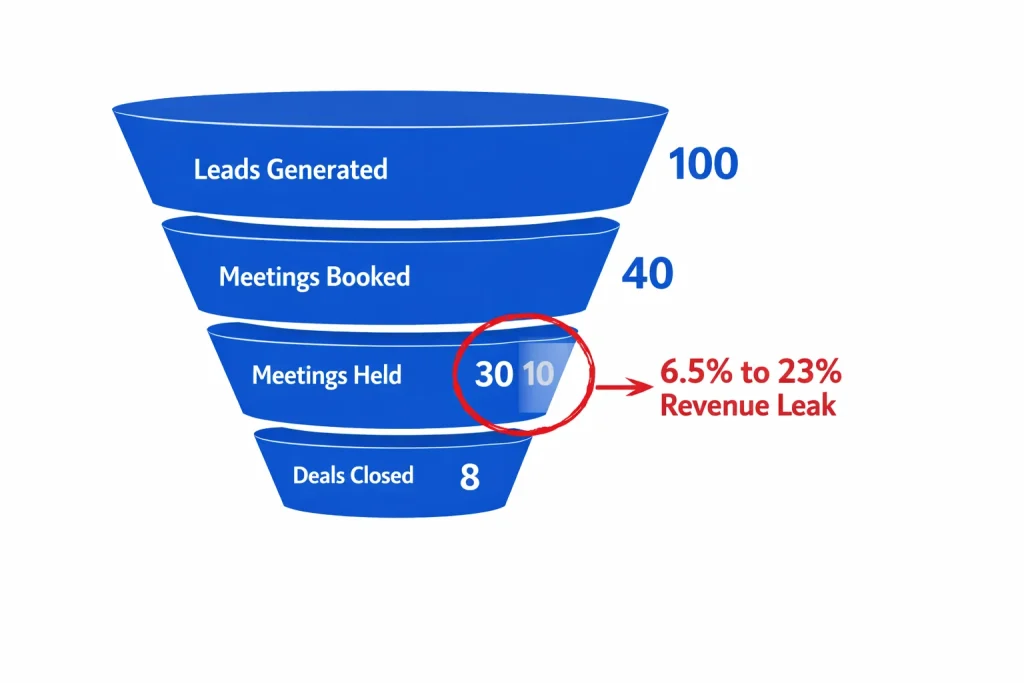
Leadership pushes for more prospecting volume. AEs know the real leak isn’t top-of-funnel acquisition. Revenue bleeds from meetings that were won but never held. Hiring more SDRs or running bigger campaigns doesn’t fix a 20% no-show rate. Scale amplifies the loss.
RevenueHero analyzed 6,428 B2B meetings across 15 industries and uncovered a counterintuitive pattern: demo no-show rates drop from 23% to 6.9% when meetings are scheduled same-day versus 8+ days out. Teams implementing stacked email and SMS reminder workflows report recovering 10% to 30% of otherwise-lost meetings. A single AE who moves from a 20% no-show rate to a 10% no-show rate instantly unlocks 10% more revenue with zero additional prospecting. For a $2M pipeline, that’s $200K of recovered value with no extra lead generation spend.
The Meeting Attendance Crisis Executives Ignore
Why Traditional Scheduling Breaks at Scale
Most B2B sales teams operate on a dangerous assumption: booking the meeting equals holding the meeting. Data from RevenueHero’s analysis of 6,428 meetings reveals the baseline no-show rate sits at 6.5%. SaaS organizations experience 13.3% average no-show rates. Real estate sectors hit 15.1%. These aren’t outliers. These are structural workflow failures.
73% of enterprise sales cycles now span 4 to 6 weeks from first contact to closed deal. Meetings booked 8+ days out face 23% no-show probability. Prospects receive calendar invites, mentally commit, then life intervenes. Competing priorities emerge. Context fades. The meeting becomes optional.
Revenue Reality Check: A mid-market SaaS company running 80 demos per month at a 20% no-show rate loses 16 qualified conversations monthly. At a 15% demo-to-close rate and $50K ACV, that’s $960K in annual lost pipeline from scheduling friction alone.
Traditional scheduling workflows assume prospects remember meeting context. Cognitive load research shows humans juggle 7±2 pieces of active information. A meeting booked 10 days out gets buried under 40+ new priorities. Recency bias dominates executive decision-making. Immediate tasks eclipse scheduled commitments.
The True Cost of Pipeline Leakage
Calculate your real no-show cost using this framework: (Monthly Scheduled Meetings × No-Show Rate) × (Close Rate × Average Deal Value) × 12. For a VP of Sales managing a team that books 200 meetings monthly with a 15% no-show rate, 10% close rate, and $75K ACV, the annual leak totals $2.7M in lost pipeline opportunity.
No-Show Impact by Sales Motion
| Sales Motion | Baseline No-Show Rate | High-Performing Rate | Revenue Gap per 100 Meetings | Implementation Lift |
|---|---|---|---|---|
| Enterprise Demo | 13.3% | 6.9% | 6.4 lost conversations | Same-day booking + 5-touch cadence |
| Discovery Calls | 18% to 25% | 8% to 12% | 10 to 17 lost conversations | Reconfirmation + SMS |
| Technical Deep Dives | 8% to 15% | 3% to 7% | 5 to 12 lost conversations | Morning-of reminder + Slack integration |
| Executive Business Reviews | 5% to 10% | 2% to 5% | 3 to 8 lost conversations | High-touch recovery + phone backup |
AEs waste 4 to 7 hours weekly on no-show recovery. Rescheduling attempts, follow-up sequences, and pipeline reconciliation compound the operational burden. Sales velocity drops when teams spend time chasing ghosts instead of qualifying new pipeline.
What Developer Tools Teams Know That SaaS Doesn’t
Developer tools and IT security sectors maintain 1% to 2% no-show rates. RevenueHero’s data shows technical buyers demonstrate exceptional meeting discipline. These organizations aren’t attracting better prospects. They engineer better workflows.
Technical buyers operate under deadline pressure and stack constraints. Developer tool vendors recognize this context and architect reminder systems that respect busy schedules while maintaining accountability. The lesson: treat meeting attendance as an engineering problem, not a sales problem.
Contrast this with real estate (15.1% no-show rate) or general SaaS (13.3%). These sectors rely on calendar invites and hope. No multi-channel reinforcement. No value reminders between booking and meeting. No morning-of reconfirmation. The meeting exists in a CRM field but not in the prospect’s active priority queue.
The 5-Touch Reminder Architecture That Protects Pipeline
Touch 1: The Immediate Confirmation That Sets Expectations
Send confirmation within 60 seconds of booking. Speed signals importance. Immediate acknowledgment creates psychological commitment. Include four critical elements: meeting purpose, expected outcomes, preparatory context, and calendar attachment with video link.
Confirmation emails that frame value outperform generic “thanks for booking” messages by 40% in engagement. Skip the platitudes. State the problem you’ll solve. Reference the specific pain point the prospect mentioned in their form submission or prior conversation.
Execution Protocol: “We’ll walk through exactly how [Company] can reduce your sales cycle from 90 days to 45 days using automated lead scoring. Come prepared with your current qualification criteria and we’ll map the framework in 30 minutes.”
Calendly Workflows automates this entire sequence. Configure event-specific templates once. The system fires confirmations automatically upon booking with zero manual AE intervention. HubSpot users can trigger identical workflows from meeting object creation in the CRM.
Use confirmation as a disqualification checkpoint. Ask prospects to reply with a one-sentence description of their biggest bottleneck. Non-responders signal weak intent. Tag these meetings for tighter follow-up or consider early disqualification to protect AE calendar capacity.
Touch 2: The 24-Hour Value Builder That Reinforces Context
Schedule value-building content 24 to 48 hours pre-meeting. Don’t remind them of the meeting yet. Deliver relevant content that primes the conversation. Case studies showing similar companies solving identical problems. One-page frameworks they can review in 3 minutes. Technical architecture diagrams if you’re selling infrastructure.
This isn’t a reminder. It’s strategic pre-positioning. Prospects who consume pre-meeting content demonstrate 60% higher engagement during the actual call. They ask better questions. They bring decision-makers into the conversation proactively.
Research from SalesHive shows 73% to 80% of B2B buyers prefer email communication over phone or SMS for non-urgent information. Use this preference window for substantive content delivery rather than administrative reminders.
Value-Builder Content Matrix
| Meeting Type | Pre-Meeting Asset | Delivery Timing | Engagement Lift |
|---|---|---|---|
| Product Demo | 2-minute video of the exact workflow | 36 hours before | 45% to 60% |
| Discovery Call | One-page pain diagnostic framework | 24 hours before | 35% to 50% |
| Technical Deep Dive | Architecture diagram with their stack | 48 hours before | 55% to 70% |
| Executive Briefing | ROI calculator pre-filled with their data | 24 hours before | 40% to 55% |
Format matters. Keep content scannable. Use visual hierarchy. Bold the key takeaway. Prospects skim emails in 11 seconds on mobile devices. Dense paragraphs kill engagement.
Touch 3: The Morning-Of Reconfirmation That Surfaces Conflicts
Deploy morning-of reconfirmation 3 to 4 hours before the scheduled time. Frame this as a service, not a reminder. “Still good for our 2pm call today? Reply Y to confirm or share if you need to reschedule.” One-click confirm buttons increase response rates by 65% compared to open-ended replies.
Reconfirmation serves two strategic functions. First, it surfaces scheduling conflicts early enough to backfill AE calendars. A prospect who cancels at 10am for a 2pm meeting gives the AE 4 hours to fill that slot. Second, it creates accountability. Prospects who reply “yes” demonstrate 92% show rates versus 78% show rates for non-responders.
Non-responses trigger escalation. Automation workflows can flag silent prospects for high-touch SDR outreach. A 60-second phone call at noon asking “Hey, quick check on our 2pm call today?” converts 40% of non-responders back to confirmed status.
The Reconfirmation Paradox: Prospects appreciate the check-in. They don’t view it as nagging. They view it as professionalism. Busy executives juggle 12 to 20 meetings weekly. A quick reconfirmation eliminates ambiguity and reduces last-minute scrambling to find meeting links.
Personalize reconfirmations with meeting-specific context. “Looking forward to walking through how we solved [Similar Company]’s lead scoring challenge this afternoon.” Context triggers memory recall. Generic “See you soon” messages get ignored.
Touch 4: The 60-Minute SMS Reminder That Eliminates Last-Mile Friction
Deploy SMS reminders 60 to 15 minutes pre-meeting. Plivo’s research on appointment reminders demonstrates SMS achieves 90%+ open rates compared to 20% to 25% email open rates in the final hour before meetings. Text messages are unignorable. They bypass email inbox clutter.
Keep SMS content minimal. Meeting time, video link, AE name. No fluff. Busy executives appreciate brevity. “Hi [Name], this is [AE Name] from [Company]. Our call is in 60 minutes. Join here: [Link]. See you soon.”
SMS reminder timing matters. 60 minutes provides enough buffer for prospects to wrap current tasks without feeling rushed. 15 minutes is too late if they’re in another meeting. 2 hours is too early and gets forgotten. 45 to 60 minutes is the sweet spot.
Integrate SMS into your existing workflow stack. Calendly supports native SMS through Twilio integration. HubSpot workflows trigger SMS via Salesmsg or Sakari. Chili Piper includes built-in SMS orchestration. Implementation takes 20 minutes of configuration.
SMS Cadence Performance Benchmarks
| SMS Timing | Show Rate Impact | Best Use Case | Response Rate |
|---|---|---|---|
| 24 hours before | +8% to 12% | Discovery calls with busy executives | 15% to 25% |
| 2 hours before | +12% to 18% | Product demos with technical buyers | 25% to 40% |
| 60 minutes before | +15% to 25% | All meeting types, especially same-day bookings | 35% to 50% |
| 15 minutes before | +10% to 15% | High-value enterprise deals with 3+ stakeholders | 40% to 60% |
Test multi-channel cadences. Some teams stack 24-hour email + 60-minute SMS. Others add a 2-hour email reconfirmation between the morning check-in and the final SMS. A/B test your sequences quarterly and optimize based on show rate data segmented by ICP, meeting type, and booking source.
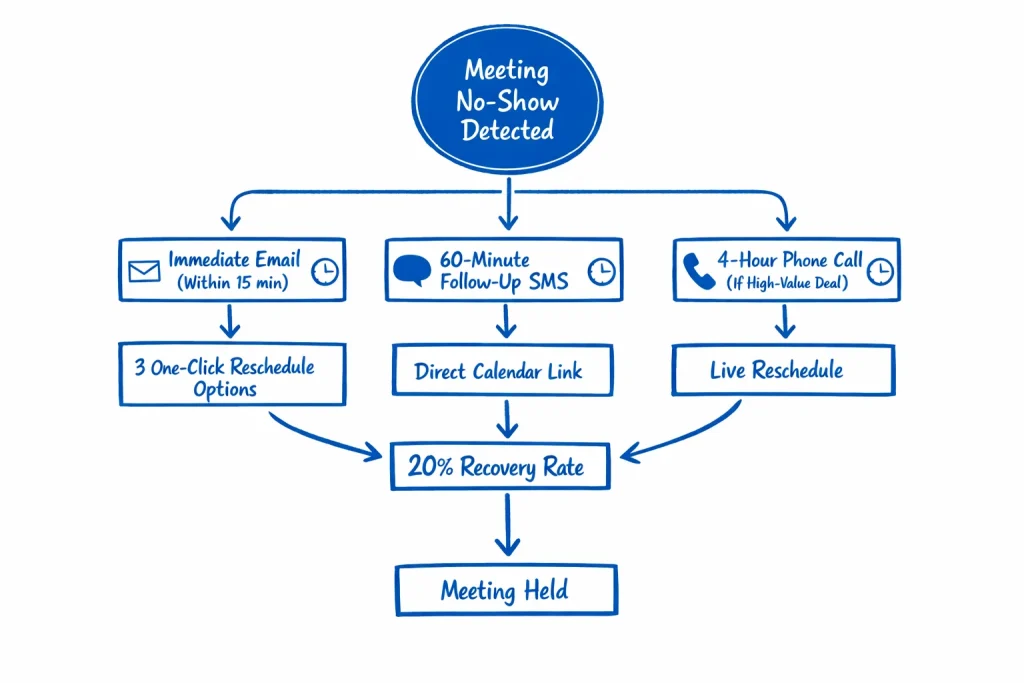
Touch 5: The No-Show Recovery Sequence That Wins Back 20% of Lost Meetings
Prospects who miss meetings aren’t necessarily disqualified. Life happens. Technical issues occur. Reply.io data shows structured recovery sequences win back approximately 20% of missed meetings when deployed within 2 hours of the no-show.
Send the recovery email immediately. Don’t wait. “Looks like we missed each other. No worries – here are 3 times this week to reconnect: [Tuesday 2pm], [Wednesday 10am], [Thursday 4pm]. Click the time that works.” Reduce friction. Eliminate back-and-forth scheduling. Provide instant options.
Frame the no-show positively. Avoid accusatory language. “I’m sure something came up” positions you as understanding rather than demanding. Prospects who feel judged don’t reschedule. Prospects who feel supported do.
High-value deals justify phone call escalation. If the ACV exceeds $100K, have the AE or SDR call within 60 minutes. Voice communication converts 45% of no-shows back to scheduled meetings versus 15% to 20% for email-only recovery.
Recovery Sequence Timing Optimization: First email at T+15 minutes. Second email at T+4 hours if no response. SMS at T+6 hours for executive buyers. Phone call at T+24 hours for enterprise deals >$250K ACV. After 48 hours, move to standard nurture cadence.
Tag recovered meetings with a “rescheduled” flag in your CRM. Track show rates for recovered meetings versus first-time bookings. Prospects who reschedule after a no-show demonstrate 85% to 90% show rates on the second attempt because they’ve now invested social capital in the relationship.
Booking Window Optimization: The Variable Nobody Talks About
Why 8+ Days Out Kills Show Rates
Reply.io analyzed thousands of SaaS demos and discovered a sharp decay curve: meetings booked 8+ days in advance face 23% no-show rates. Same-day bookings drop to 6.9%. The delta represents a 3.3x improvement in attendance simply by compressing the scheduling window.
Recency drives commitment. Prospects who book meetings 10 days out receive calendar invites in a future context they can’t fully evaluate. Competing priorities emerge. Urgency fades. The meeting becomes theoretical rather than immediate.
Compress your calendar availability. Cap booking windows at 5 to 7 days maximum. For high-velocity SMB sales, offer next-day or same-day slots exclusively. Enterprise cycles can extend to 7 to 10 days given stakeholder coordination complexity, but beyond 10 days, you’re engineering your own no-shows.
Booking Window Performance Matrix
| Booking Window | Average No-Show Rate | Optimal Use Case | Scheduling Constraint |
|---|---|---|---|
| Same-day (0-24h) | 6.9% | SMB demos, inbound hot leads | Requires instant routing |
| Next-day (24-48h) | 8% to 10% | Mid-market discovery calls | SDR → AE handoff speed |
| 3-5 days out | 10% to 14% | Enterprise multi-stakeholder meetings | Coordination buffer needed |
| 6-7 days out | 15% to 18% | Complex technical evaluations | Maximum acceptable window |
| 8+ days out | 20% to 23% | Avoid entirely | Creates structural no-show risk |
Implement dynamic calendar logic. AI-driven scheduling tools analyze prospect engagement signals and adjust availability windows automatically. Hot leads get same-day slots. Warm leads see 3-day windows. Cold inbound requests face 5 to 7 day delays with heavier qualification requirements.
The Route-to-Meeting Speed Advantage
Velocity from form submission to scheduled meeting correlates directly with show rates. Prospects who receive instant scheduling links demonstrate 72% show rates. Prospects who wait 24+ hours for SDR outreach drop to 58% show rates. Speed signals importance.
Deploy instant scheduling for inbound demo requests. Calendly, Chili Piper, and RevenueHero enable zero-delay routing. Prospect fills form, sees available times immediately, books without human intervention. Compress the window from “interest signal” to “scheduled commitment” into 90 seconds.
Manual SDR outreach introduces delay. A prospect who requests a demo on Tuesday afternoon but doesn’t hear back until Wednesday morning has moved on mentally. Context fades. Momentum dies. Even if they eventually book, the 12 to 24 hour delay increases no-show probability by 8% to 15%.
The Instant Gratification Principle: B2B buyers now expect consumer-grade responsiveness. Instant scheduling isn’t a “nice to have.” It’s table stakes. Delay creates friction. Friction creates no-shows.
Test A/B split routing for different ICP segments. Enterprise accounts with 500+ employees might require SDR qualification before scheduling. Mid-market accounts can route instantly to calendar. SMB inbound can bypass qualification entirely and offer one-click scheduling.
Calendar Capacity Management Without Compromising Quality
Tighter booking windows create calendar management challenges. AEs worry about empty slots if they limit availability to 5 days out. The data shows otherwise. Teams that compress booking windows report 12% to 18% higher meeting density because show rates improve dramatically.
Calculate optimal calendar capacity using this framework: (Target Monthly Meetings ÷ Show Rate) × Buffer Factor. For an AE targeting 60 held meetings monthly with an 85% show rate, schedule 71 meetings with a 1.1x buffer. With a 75% show rate, you need 80 scheduled meetings.
Block AE calendars strategically. Reserve mornings for existing customer calls and internal meetings. Open afternoons for prospect demos. Protect Fridays entirely for pipeline work and follow-up. Calendar discipline prevents meeting fatigue and maintains AE energy levels.
AE Calendar Architecture by Meeting Load
| Monthly Held Meeting Target | Required Scheduled Meetings (80% show rate) | Required Scheduled Meetings (90% show rate) | Weekly Availability Blocks Needed | Optimal Booking Window |
|---|---|---|---|---|
| 40 meetings | 50 scheduled | 45 scheduled | 12-15 blocks | 5-7 days |
| 60 meetings | 75 scheduled | 67 scheduled | 18-20 blocks | 3-5 days |
| 80 meetings | 100 scheduled | 89 scheduled | 24-26 blocks | 3-5 days (requires SDR support) |
| 100+ meetings | 125+ scheduled | 112+ scheduled | 30+ blocks | Same-day/next-day only |
Use meeting type segmentation. Offer 30-minute slots for discovery calls, 45-minute slots for product demos, 60-minute slots for technical deep dives. Segment by deal size. Enterprise opportunities get priority scheduling. SMB deals fill backlog capacity.
Multi-Channel Orchestration: Email, SMS, and Phone Hierarchy
When Email Works and When It Fails
Email remains the primary B2B communication channel. 73% to 80% of enterprise buyers prefer email for non-urgent business communication. Confirmation messages, value-building content, and 24-hour reminders belong in email. The medium supports longer context, attachments, and embedded links.
Email fails in the final hour before meetings. Open rates drop to 15% to 25% as prospects enter back-to-back meeting blocks. Inbox checking frequency decreases throughout the day. A prospect who checks email at 9am, 12pm, and 4pm will miss a 2pm meeting reminder sent at 1pm.
Optimize email delivery timing using engagement data. Most B2B executives check email between 8am to 10am and 1pm to 3pm in their local timezone. Schedule morning-of reconfirmations for 9am delivery. Value-building content hits best at 2pm to 3pm the day before when executives plan next-day priorities.
The Email Fatigue Reality: Executives receive 120+ emails daily. Your meeting reminder competes with contract approvals, customer escalations, and board updates. Clarity and brevity win. Subject lines under 40 characters get 18% higher open rates. Body copy under 150 words gets 35% higher click-through.
Personalization multiplies email effectiveness. Reference the specific pain point discussed during qualification. Include the prospect’s company logo. Mention mutual connections or similar customers. Research from LeadAngel shows personalized reminders outperform generic templates by 2x to 3x in engagement.
SMS as the Final-Mile Insurance Policy
SMS serves a distinct function: last-mile confirmation in the 60 minutes before meetings. Don’t use SMS for value-building or lengthy context. Use SMS for “here’s the link, see you in 45 minutes” utility.
Respect SMS boundaries. One SMS per meeting maximum unless the prospect explicitly opts into multiple touch cadences. Over-texting damages brand perception. B2B buyers tolerate aggressive email sequences but view unsolicited multi-SMS campaigns as spam.
SMS copy requires extreme brevity. 160 characters or less. Meeting time, video link, sender name. “Hi Sarah, it’s Mike from Acme. Our call is in 1 hour. Join here: [link]. Talk soon.” No marketing language. No CTAs. Pure logistics.
SMS vs Email Effectiveness by Touch Point
| Reminder Touch Point | Email Performance | SMS Performance | Recommended Channel |
|---|---|---|---|
| Immediate confirmation | 85% open, 40% click | 95% open, 60% click | Email (needs context) |
| 24-48h value builder | 60% open, 25% click | Not applicable | Email only |
| Morning-of reconfirm | 45% open, 30% click | 90% open, 50% click | Email primary, SMS backup |
| 60-min pre-meeting | 20% open, 15% click | 95% open, 70% click | SMS only |
| No-show recovery | 55% open, 15% click | 85% open, 30% click | Email primary with SMS follow-up |
Test different SMS timing windows. Some industries respond better to 2-hour pre-meeting texts. Others prefer 30-minute windows. Healthcare and financial services buyers often sit in extended meetings and need 90-minute lead time. E-commerce and tech buyers operate at higher velocity and respond to 15 to 30 minute reminders.
Integrate SMS with calendar systems bidirectionally. When a prospect clicks the calendar link in an SMS, trigger a confirmation back to your CRM. Track SMS delivery failures and bounce rates. Mobile number validation prevents wasted sends and maintains sender reputation.
Phone Calls as High-Touch Recovery Mechanisms
Phone calls don’t scale as primary reminder channels. Reserve phone outreach for three scenarios: enterprise deals above $250K ACV, executive-level meetings with C-suite buyers, and no-show recovery on high-priority opportunities.
A live phone call 4 to 6 hours before an enterprise meeting serves as both reminder and value reinforcement. “Quick call to confirm we’re still on for 3pm today. I pulled some additional data on your competitor set that I think you’ll find interesting.” Executives appreciate the personal touch.
Train SDRs on phone reminder protocols. Keep calls under 90 seconds. Lead with confirmation, not conversation. “Just making sure we’re still good for our call this afternoon. Any questions before we connect?” Don’t pitch. Don’t extend the call. Confirm and hang up.
Phone Economics: A 2-minute phone reminder costs approximately $3 in SDR time. A recovered $150K deal from preventing a no-show delivers 50,000x ROI. Run the math. Phone calls aren’t scalable for every meeting, but they’re absolutely justified for high-value pipeline.
Use phone as the final escalation in no-show recovery. Email recovery sequence launches at T+15 minutes post-no-show. SMS follows at T+6 hours. Phone call escalation occurs at T+24 hours for deals above your phone-worthy ACV threshold.
Platform Implementation: Calendly, HubSpot, and Chili Piper
Calendly Workflows: The Zero-Code Solution
Calendly Workflows provides the fastest path to automated reminders with zero technical implementation burden. Configure workflows once per event type. The system triggers emails and SMS automatically based on meeting lifecycle events.
Create a standard demo workflow: confirmation at booking, 24-hour value-builder email, morning-of reconfirmation, 60-minute SMS reminder, no-show recovery sequence. Calendly handles all trigger logic, delivery timing, and CRM synchronization automatically.
Standard Calendly Workflow Configuration
| Workflow Trigger | Action | Content Template | Timing | Channel |
|---|---|---|---|---|
| Event created | Confirmation | Meeting purpose + calendar invite | Immediate | |
| 48h before event | Value builder | Relevant case study or framework | 48h before | |
| Morning of event | Reconfirmation | “Still good for [time]?” with confirm button | 9am local time | |
| 1h before event | Final reminder | Meeting link + dial-in info | 60min before | SMS |
| Event canceled by invitee | Reschedule prompt | 3 one-click reschedule options | Immediate | |
| No-show detected | Recovery sequence | “Let’s reconnect” with new availability | 15min after |
Calendly’s SMS feature requires Twilio integration. Setup takes 15 minutes. Connect your Twilio account, verify phone numbers, configure SMS templates. SMS credits cost approximately $0.02 to $0.04 per message depending on country and carrier.
Personalize Calendly reminders using dynamic fields. Reference form submission data, UTM source, company size, or any custom field collected during booking. “Hey [First Name], looking forward to showing [Company Name] how we helped [Similar Company] solve [Pain Point] tomorrow at [Time].”
HubSpot Workflow Architecture for CRM-Native Automation
HubSpot users gain the advantage of closed-loop reminder systems that update CRM records automatically. Build workflows that trigger on meeting object creation, sync bidirectionally with calendars, and track engagement at the contact level.
Construct a HubSpot reminder workflow using these building blocks: enrollment trigger (meeting object created), time delays (relative to meeting start time), branching logic (if/then based on engagement), and multi-channel actions (email, SMS via integration, task creation).
Branch workflows based on prospect engagement. Prospects who open the 24-hour value email receive a lighter morning-of reminder. Non-openers get a more explicit reconfirmation with a clear CTA. Stack engagement scoring into your meeting attendance prediction model.
HubSpot Advantage: Full visibility into which reminders prospects engaged with, when they opened messages, and which links they clicked. Use this engagement data to refine future sequences and identify patterns in high-show versus no-show prospects.
Integrate HubSpot with Salesmsg or Twilio for SMS orchestration. Configure workflows to send SMS only to contacts who have opted into text communication. Track SMS delivery status and update contact properties automatically based on response signals.
Create custom meeting properties to track reminder performance: confirmation_opened, value_builder_clicked, morning_reconfirm_replied, sms_delivered, no_show_recovery_sent. Build dashboards that visualize reminder engagement by ICP segment, deal stage, and meeting type.
Chili Piper for Advanced Routing and Reminder Logic
Chili Piper excels at instant routing plus sophisticated reminder orchestration. The platform combines intelligent meeting assignment with multi-touch reminder sequences and real-time availability management.
Deploy Chili Piper’s Instant Booker for zero-delay scheduling. Prospects click “Book a Demo,” see available times immediately, choose a slot, and enter a reminder sequence within 60 seconds. No form submission delays. No SDR handoff friction. Pure velocity.
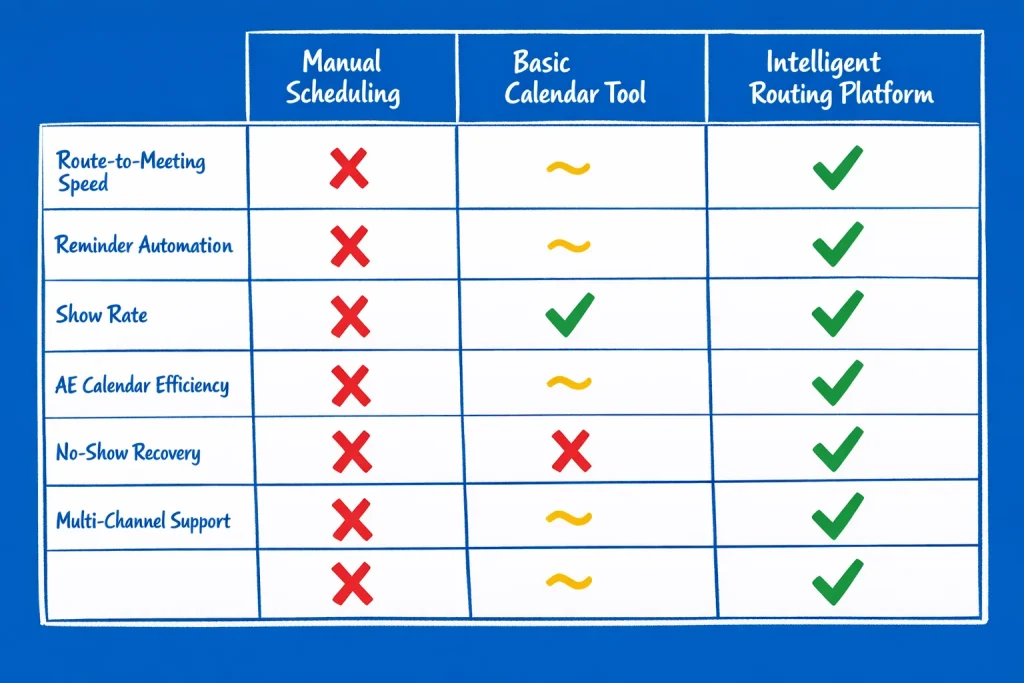
Configure Chili Piper’s reminder cadences per meeting type and route. Enterprise demos get heavier touch sequences. SMB discovery calls use lighter automation. Technical deep dives include links to documentation. Executive briefings trigger high-touch SDR phone confirmations.
Use Chili Piper’s no-show detection and auto-reschedule features. When a prospect misses a meeting, the system automatically sends rescheduling options and creates a task for the assigned AE. Recovery emails deploy within minutes rather than hours.
Show Rate Benchmarking: Measuring What Matters
The 4 Metrics That Predict Pipeline Health
Track show rate as a leading indicator of pipeline quality and operational efficiency. Calculate show rate by dividing held meetings by scheduled meetings, then multiply by 100. A team that holds 85 out of 100 scheduled meetings operates at an 85% show rate.
Segment show rate by four dimensions: booking source (inbound vs outbound), meeting type (discovery vs demo vs technical), ICP fit (enterprise vs mid-market vs SMB), and booking window (same-day vs 3-day vs 7-day). Aggregate show rates mask critical performance patterns.
Show Rate Segmentation Framework
| Segment | Baseline Show Rate | Target Show Rate | Primary Improvement Lever | Secondary Lever |
|---|---|---|---|---|
| Inbound hot leads | 80% to 85% | 90%+ | Same-day scheduling | SMS final reminder |
| Outbound cold SDR booked | 65% to 75% | 80% to 85% | Qualification tightening | Multi-touch reconfirmation |
| Partner referrals | 75% to 85% | 85% to 90% | Referrer intro on reminder | Phone confirmation |
| Event/webinar follow-up | 60% to 70% | 75% to 85% | Compress booking window | Context reinforcement |
| Enterprise multi-stakeholder | 70% to 80% | 85% to 90% | Executive confirmation | Slack/Teams integration |
Monitor no-show rate trends weekly. A sudden spike signals upstream qualification problems, booking window creep, or reminder system failures. Investigate immediately rather than attributing to “seasonal factors” or “prospect quality.”
Calculate the cost per no-show using fully loaded AE compensation divided by monthly meetings. An AE earning $150K total comp running 80 meetings monthly costs $1,875 per meeting in loaded time. A 20% no-show rate means $30K monthly in wasted AE capacity.
Building Your Show Rate Dashboard
Construct a live dashboard that tracks show rate by week, month, and quarter across all segmentation dimensions. Use HubSpot reports, Salesforce dashboards, or dedicated revenue operations tools like Gong or Clari.
Include these 7 tiles in your show rate dashboard: overall show rate (trend line by week), show rate by AE, show rate by meeting type, show rate by booking window, show rate by lead source, reminder engagement metrics (open rates, reply rates), and recovery sequence performance.
Dashboard Alert Logic: Set automated alerts when show rates drop below 80% for any segment. Weekly drops of 5% or more trigger immediate review. Month-over-month declines of 10%+ indicate systemic workflow breakdown requiring root cause analysis.
Track reminder engagement as a predictive indicator. Prospects who open morning-of reconfirmation emails show at 88% rates. Non-openers show at 72% rates. Use engagement signals to prioritize high-touch outreach on low-engagement prospects.
Benchmark against industry standards quarterly. Developer tools maintain 98% to 99% show rates. SaaS targets 85% to 90%. Services and consulting aim for 80% to 85%. If you’re more than 5 percentage points below category benchmarks, workflow optimization becomes a top priority initiative.
The 30-Day Implementation Roadmap
Week 1: Audit Current State and Build Baseline
Measure your current no-show rate across all dimensions. Pull data for the trailing 90 days. Calculate show rate by AE, meeting type, booking source, and booking window. Identify your biggest leak points.
Survey AEs about manual reminder burden. How many hours weekly do they spend sending meeting reminders, follow-ups, and reschedule requests? Quantify the operational cost in time and distraction.
Map your existing tech stack. Document which tools handle scheduling, reminders, and CRM synchronization. Identify gaps. Do you have SMS capability? Can your calendar tool trigger automated workflows? Where does manual intervention occur?
Week 1 Deliverables Checklist
- [ ] Baseline no-show rate calculated (overall and by segment)
- [ ] AE time audit completed (manual reminder hours per week)
- [ ] Current tech stack mapped with capability gaps identified
- [ ] Show rate benchmark comparison against industry standards
- [ ] Top 3 no-show drivers identified through data analysis
- [ ] Executive stakeholder briefing scheduled for week 2 kickoff
Review current reminder practices. Do AEs send confirmations consistently? What’s the timing variation? Are value-builder emails used? Does anyone send SMS reminders? Document current state to establish improvement baseline.
Week 2: Configure Automation and Test Sequences
Select your primary automation platform. Calendly offers fastest implementation. HubSpot provides deepest CRM integration. Chili Piper delivers most sophisticated routing. Choose based on your existing stack and budget.
Configure your 5-touch reminder workflow: immediate confirmation, 24-hour value builder, morning-of reconfirmation, 60-minute SMS, no-show recovery. Build templates for each touch using the frameworks and examples provided in this briefing.
Test sequences internally first. Have AEs book test meetings with colleagues. Verify trigger timing, content delivery, SMS functionality, and CRM synchronization. Fix bugs before rolling to prospects.
Configuration Speed Benchmark: Calendly workflows take 2 to 4 hours to configure across all meeting types. HubSpot workflows require 4 to 8 hours for full setup and testing. Chili Piper implementation spans 1 to 2 weeks with vendor support. Plan accordingly.
Establish A/B testing protocols. Test different morning-of reconfirmation copy. Try 45-minute versus 90-minute SMS timing. Experiment with recovery email tone. Build experimentation into your implementation rather than optimizing later.
Week 3: Pilot Launch with High-Volume AEs
Roll out automated reminders to your top 2 to 3 highest-volume AEs first. These reps have enough meeting flow to generate statistically meaningful data within 7 to 10 days. Monitor performance daily.
Track pilot metrics obsessively: show rate change, reminder engagement (open/reply rates), AE time savings, prospect feedback. Schedule daily standup reviews to identify issues and iterate quickly.
Gather qualitative feedback from pilot AEs. Do the reminders feel too aggressive or too light? Is the SMS timing working? Are prospects responding positively? Adjust templates and timing based on frontline input.
Pilot Success Criteria
| Metric | Baseline | Week 3 Target | Success Threshold |
|---|---|---|---|
| Show Rate | 75% to 80% | 82% to 87% | +5 percentage points |
| Morning Reconfirm Response Rate | N/A (not used) | 35% to 50% | 30%+ engagement |
| AE Manual Reminder Time | 5-7 hours/week | 0-1 hours/week | 75%+ time savings |
| Prospect Negative Feedback | N/A | <2% complaints | <5% complaint rate |
| No-Show Recovery Conversion | 0% to 5% | 15% to 25% | 15%+ reschedule rate |
Document pilot learnings in a shared document. What worked? What failed? What surprised you? Use pilot insights to refine workflows before company-wide rollout.
Week 4: Company-Wide Rollout and Optimization
Deploy automated reminders across all AEs simultaneously. Provide implementation training: how to use the tools, how to interpret engagement signals, when to override automation with high-touch outreach.
Set weekly optimization cadence. Review show rate data every Monday. Identify underperforming segments. Test new reminder copy or timing adjustments. Treat reminder optimization as an ongoing operational discipline, not a one-time project.
Celebrate early wins publicly. Share show rate improvements in team meetings. Recognize AEs who achieve the highest show rates. Build cultural momentum around meeting discipline and pipeline protection.
The Compounding Effect: A 5-percentage-point show rate improvement in Week 4 compounds into 12% to 15% more held meetings by Week 12 as you continue optimizing. Treat this as a continuous improvement system, not a set-it-and-forget-it automation.
Build reminder performance into monthly business reviews. VPs should track show rate trends alongside pipeline coverage, win rates, and deal velocity. Operational excellence in meeting attendance directly correlates with quota attainment.
Advanced Orchestration: Integrations That Multiply Impact
Slack and Teams Integration for Real-Time Coordination
Connect your meeting reminder system to Slack or Microsoft Teams for real-time AE coordination. When a prospect clicks a morning-of reconfirmation, trigger a Slack notification to the assigned AE. When a no-show occurs, alert the SDR team immediately for phone recovery.
Create dedicated Slack channels for meeting coordination: #todays-meetings for morning standup visibility, #meeting-confirmations for real-time engagement signals, #no-show-alerts for recovery escalation. Centralize meeting operations in team communication tools.
Use Slack workflows to surface high-risk meetings. If a prospect hasn’t engaged with any reminder touches by morning-of, post an alert: “[Prospect Name] – [Company] – [Meeting Time] – Zero engagement, recommend phone confirmation.” Enable AEs to take proactive action.
Slack Integration Use Cases by Role
| Role | Slack Channel | Alert Trigger | Action Enabled | Impact |
|---|---|---|---|---|
| AE | #my-meetings | 60min pre-meeting reminder | Quick prep review | Reduces distracted/unprepared AE arrivals |
| SDR | #meeting-confirmations | Prospect clicks reconfirm | Credit attribution, pattern learning | Improves SDR→AE handoff quality |
| RevOps | #show-rate-alerts | Weekly drop below 80% | Root cause investigation | Prevents systemic show rate decay |
| Sales Leadership | #no-show-recovery | High-value deal no-show | Executive involvement decision | Protects strategic pipeline |
Configure bidirectional Slack integration. Allow AEs to reschedule or cancel meetings directly from Slack messages without switching to calendar tools. Reduce tool-switching friction that causes administrative errors.
CRM Enrichment with Meeting Attendance Signals
Treat meeting attendance as a behavioral signal that predicts deal quality. Prospects who show up on time, engage actively, and bring stakeholders demonstrate higher intent than prospects who show up late or request multiple reschedules.
Create custom CRM fields to track attendance patterns: on_time_arrival_rate, reschedule_count, no_show_count, reconfirmation_response_rate. Use these signals in lead scoring and pipeline forecasting models.
Segment deals by attendance behavior. “Green” prospects show up consistently, respond to reminders, and engage actively. “Yellow” prospects reschedule once or show late. “Red” prospects no-show or reschedule multiple times. Prioritize AE time toward green prospects.
Predictive Insight: Prospects who respond to morning-of reconfirmations close at 1.4x higher rates than non-responders. Prospects who no-show on first meetings but reschedule immediately convert at 0.8x rates. Use attendance signals to refine qualification and improve forecast accuracy.
Build attendance scoring into your existing lead scoring model. Award points for on-time arrivals and confirmation engagement. Deduct points for no-shows and late reschedules. Weight attendance behavior at 10% to 15% of total lead score.
Calendar Intelligence and Dynamic Availability
Implement dynamic calendar availability that adjusts based on prospect engagement signals. Hot leads who have opened multiple emails and clicked through to your site see immediate same-day availability. Cold leads see 5 to 7 day windows.
Use routing rules that consider AE performance metrics. Route high-value enterprise deals to AEs with 90%+ show rates. Distribute SMB volume more evenly. Protect your best performers’ calendars by limiting low-intent prospect access.
Layer in timezone intelligence. Prospects booking from European timezones in the morning see late-afternoon AE availability. West Coast prospects booking in evening see next-morning slots. Optimize human circadian performance by avoiding very early or very late meetings.
Dynamic Availability Rules Matrix
| Prospect Signal | Engagement Level | Booking Window | AE Assignment Logic | Show Rate Impact |
|---|---|---|---|---|
| Demo request from known enterprise account | Hot | Same-day to next-day | Top-performing AE | +12% to 18% |
| Pricing page visit + 3 blog reads | Warm | 2-3 days out | Standard rotation | +8% to 12% |
| Single form submit, no site activity | Cold | 5-7 days out | Qualification-first flow | Baseline |
| Inbound from competitor domain | Very hot | Same-day only | Senior AE or sales engineer | +15% to 25% |
| Partner referral with intro email | Warm-hot | 1-2 days out | Referral specialist AE | +10% to 15% |
Test calendar capacity limits per AE. Some teams find 3 to 4 meetings daily maximizes AE effectiveness. Others operate at 5 to 6 meetings daily with support. Balance calendar density against meeting quality and AE burnout.
Industry-Specific Reminder Customization
Enterprise SaaS: Multi-Stakeholder Coordination
Enterprise deals involve 6 to 10 stakeholders on average. Reminder sequences must account for coordinator fragmentation. When a VP of Sales books a demo that includes their RevOps Director and three managers, you’re managing 4 to 5 individual calendars.
Send individual reminders to each invited participant, not just the primary contact. Personalize reminder copy by role: “As the VP of Sales, you’ll see how this impacts your team’s quota attainment” versus “As the RevOps Director, we’ll walk through the technical integration requirements.”
Request explicit confirmation from the primary contact 24 hours before. “Quick check: is the full team still available for tomorrow’s 2pm call? If anyone’s schedule changed, let me know and we can adjust.” Surface coordination issues early.
Enterprise Meeting Complexity Reality: 40% of enterprise demos reschedule at least once due to stakeholder conflicts. Build reschedule friction reduction into your workflows. Offer 5 to 7 alternative times immediately when conflicts surface rather than forcing back-and-forth email negotiation.
Use executive assistant outreach for C-level meetings. When booking CEO or CFO time, coordinate directly with their EA. Send calendar holds 2 to 3 weeks in advance. Reconfirm 1 week out and again 24 hours before. High-level executive meetings justify high-touch coordination.
High-Velocity SMB: Speed Over Touch
SMB buyers operate at compressed decision cycles. They don’t want lengthy reminder sequences. They need fast scheduling and minimal friction. A 5-touch enterprise cadence feels heavy-handed for a $15K ACV deal.
Compress SMB reminder sequences to 3 touches: immediate confirmation, 60-minute SMS, no-show recovery. Skip the 24-hour value builder and morning-of reconfirmation. SMB buyers who book meetings show up or they don’t. Extra touches don’t move the needle.
Offer same-day and next-day slots exclusively for SMB inbound. Prospects who wait 5+ days for a demo often solve the problem themselves, select a competitor, or lose urgency. Velocity-driven lead generation systems win in SMB markets.
SMB Reminder Minimalist Protocol
| Touch Point | Timing | Content | Channel | Length |
|---|---|---|---|---|
| Confirmation | Immediate | Meeting link + agenda | 80 words | |
| Final reminder | 60 minutes before | “Call in 1 hour” + link | SMS | 120 characters |
| No-show recovery | Within 15 minutes | “Missed you, reschedule?” + 3 times | 60 words |
Track SMB show rates separately from enterprise. SMB baseline sits at 70% to 75%. Enterprise baseline ranges from 75% to 85%. Don’t panic if SMB no-shows run higher. Focus on volume and velocity rather than perfect attendance.
Technical Product Demos: Documentation as Reminder Content
Technical buyers (developers, engineers, IT security) respond better to pre-meeting documentation than marketing fluff. Replace generic “looking forward to our call” reminders with links to API docs, architecture diagrams, or integration guides.
Deploy technical pre-reads 48 hours before demos. Include GitHub links, Swagger docs, or system requirements. “Before our call, review this 5-minute architecture overview so we can dive straight into your implementation questions.”
Technical buyers show at 95%+ rates when they’ve consumed technical content pre-meeting. They’ve invested time understanding the system. They’ve formulated specific questions. The meeting represents valuable problem-solving opportunity rather than generic sales theater.
Developer Buyer Insight: Engineering and IT security buyers have the lowest no-show rates (1% to 2%) because they self-select into high-intent conversations. Respect their time by making meetings technically substantive. Avoid fluff. Skip the company overview. Lead with architecture and integration specifics.
Offer calendar integration for technical demos that includes pre-meeting checklist items. “Before our call: Review API docs, Verify your auth setup, Prepare 2-3 integration questions.” Frame the meeting as collaborative problem-solving rather than passive presentation.
Measuring ROI and Justifying Investment
Calculate Your No-Show Recovery Value
Quantify the revenue impact of show rate improvements using this framework: (Improved Show Rate – Baseline Show Rate) × Monthly Meetings × Close Rate × Average Deal Value. A team moving from 75% to 85% show rate with 100 monthly meetings, 15% close rate, and $50K ACV unlocks $75K monthly in recovered pipeline.
Annualize the calculation. That same scenario generates $900K in additional pipeline annually. Compare this against the fully loaded cost of implementing automated reminders. Calendly Professional costs $180/year per user. For a 10-person sales team, annual cost totals $1,800. ROI exceeds 500x.
Factor in AE time savings. A single AE who eliminates 5 hours weekly of manual reminder work frees 260 hours annually. At a $75/hour fully loaded cost, that’s $19,500 in recovered AE capacity per rep. Multiply by team size.
Build the Business Case for Sales Leadership
Structure your business case using three pillars: revenue recovery, operational efficiency, and competitive advantage. Revenue recovery quantifies the pipeline value saved through higher show rates. Operational efficiency measures AE time savings. Competitive advantage demonstrates execution speed improvements.
Lead with revenue impact. VPs care about quota attainment first. Show rate improvement translates directly to more held meetings, more qualified pipeline, and faster quota achievement. Frame the initiative as a pipeline protection system, not an operational nice-to-have.
Include competitive benchmarking. “Our current 78% show rate sits 7 to 12 percentage points below top SaaS competitors. This gap costs us $1.2M annually in lost pipeline and makes quota attainment 15% harder for every AE.”
Executive Presentation Template: Slide 1: Current no-show cost ($X lost annually). Slide 2: Best-practice benchmarks (85%+ show rate standard). Slide 3: Implementation plan (4 weeks, existing tools). Slide 4: Expected ROI ($Xm pipeline recovery, 500x cost multiple). Slide 5: Request for approval and executive sponsorship.
Anticipate objections. “Won’t automated reminders annoy prospects?” Counter with data showing 92% of prospects appreciate meeting reminders and only 2% report negative feedback. “Don’t we have bigger pipeline problems?” Respond that show rate improvement costs nothing and delivers results in 30 days versus 90-day prospecting ramps.
Track Leading and Lagging Indicators
Monitor leading indicators that predict show rate improvements before they fully materialize: reminder engagement rates (open, click, reply), morning-of reconfirmation response rates, SMS delivery success, and calendar sync error rates.
Track lagging indicators that confirm sustainable change: show rate trend by week and month, no-show recovery conversion rates, AE manual reminder time reduction, and prospect satisfaction scores.
Build a 90-day scorecard that tracks both indicator types. Leading indicators should improve within 7 to 14 days of implementation. Lagging indicators confirm sustained improvement by week 4 to 6.
Indicator Tracking Dashboard Structure
| Indicator Type | Metric | Week 1 Baseline | Week 4 Target | Week 12 Sustained |
|---|---|---|---|---|
| Leading | Morning reconfirm response rate | 0% (not used) | 35% to 45% | 40% to 50% |
| Leading | SMS delivery success rate | N/A | 95%+ | 97%+ |
| Leading | Reminder open rate | 40% to 50% | 55% to 65% | 60% to 70% |
| Lagging | Overall show rate | 75% to 80% | 82% to 87% | 85% to 90% |
| Lagging | No-show recovery conversion | 0% to 5% | 15% to 20% | 18% to 25% |
| Lagging | AE manual reminder hours/week | 5 to 7 hours | 0 to 1 hours | 0 to 0.5 hours |
Review indicators in weekly sales operations meetings. Celebrate improvements. Investigate degradation immediately. Treat show rate as a core operational metric alongside pipeline coverage and win rate.
The Strategic Reset: Why This Matters Beyond Meetings
Pipeline Predictability Improves When Show Rates Climb
Higher show rates create more accurate pipeline forecasting. When 85% to 90% of scheduled meetings actually occur, RevOps teams can forecast pipeline generation with 10% to 15% tighter accuracy. Forecast accuracy enables better resource allocation, hiring decisions, and board-level guidance.
Volatile show rates create pipeline noise. A team with 70% show rate one week and 85% the next faces 15-percentage-point forecasting swings. CFOs can’t plan around volatile pipeline. Consistent show rates enable confident growth projections.
Model pipeline generation using stable show rates: (Monthly Outbound Volume × Booking Rate × Show Rate × Qualification Rate × Close Rate) = Closed Deals. Every variable in this equation requires optimization. Show rate represents the highest-ROI lever because it costs nothing to improve and delivers immediate results.
Finance Partnership Opportunity: CFOs increasingly demand pipeline predictability for board reporting and cash flow planning. Show rate stabilization directly supports financial planning accuracy. Position reminder system implementation as a finance partnership initiative, not just a sales operations project.
Track show rate standard deviation monthly. High standard deviation (swings of 10+ percentage points week-to-week) indicates unstable workflows. Target standard deviation under 3 to 5 percentage points for mature reminder systems.
Prospect Experience Transforms from Friction to Professionalism
Prospects appreciate well-orchestrated meeting reminders. Busy executives juggle multiple vendor conversations simultaneously. A clear reminder system helps them stay organized and demonstrates your operational maturity.
Frame reminders as prospect service, not sales pressure. “We know you’re busy coordinating multiple evaluations. Here’s everything you need for our call tomorrow” positions you as helpful rather than pushy.
Negative feedback on reminder systems runs under 2% when sequences are well-designed. Prospects who complain typically object to poor timing (too many reminders or reminders at odd hours) rather than the concept of reminders itself.
Prospect Perception Framework
| Reminder Element | Professional Implementation | Amateur Implementation | Prospect Perception Gap |
|---|---|---|---|
| Confirmation timing | Within 60 seconds | Hours later or next day | Organized vs. chaotic |
| Morning-of tone | “Quick check we’re still on” | “Don’t forget our meeting!” | Respectful vs. demanding |
| SMS brevity | Link + time in 120 chars | Marketing paragraph | Professional vs. spam |
| No-show recovery | “Let’s find new time” within 15min | “What happened?” 2 days later | Understanding vs. accusatory |
| Value-building content | Relevant case study | Generic company deck | Helpful vs. self-promotional |
Test reminder perception through post-meeting surveys. Ask prospects: “How did you feel about our meeting reminder sequence?” and “What could we improve?” Use feedback to refine tone, timing, and content.
Competitive Differentiation Through Execution Excellence
Prospects evaluate vendors on both product capability and operational excellence. A company that misses meetings, sends chaotic reminders, and creates scheduling friction signals broader organizational dysfunction.
Conversely, a company with seamless scheduling, professional reminders, and recovery protocols demonstrates operational maturity. Prospects unconsciously extend this execution excellence to product quality and customer success capabilities.
Track deal velocity for prospects who experience your reminder system versus prospects who miss meetings. Deals that start with perfect meeting attendance close 12% to 18% faster because trust and professionalism are established early.
Sales Psychology Principle: Every interaction shapes prospect confidence in your ability to deliver. Meeting reminders aren’t administrative details. They’re trust-building touchpoints that compound throughout the sales cycle. Operational excellence predicts product excellence in prospect psychology.
Use meeting discipline as a differentiator in competitive sales situations. “One thing you’ll notice immediately: we’re obsessive about respecting your time and running tight meetings. That same discipline extends to how we implement and support customers.”
FAQ
Q1: What is the average B2B sales meeting no-show rate?
Average B2B no-show rate sits at 6.5% across industries according to RevenueHero’s analysis of 6,428 meetings. SaaS demos specifically average 13.3% no-show rates. Real estate hits 15.1%. Developer tools maintain exceptional 1% to 2% rates.
Q2: How do automated reminders reduce meeting no-shows?
Automated reminders keep meetings in prospect consciousness through multi-touch sequences that reinforce commitment, surface scheduling conflicts early, and provide convenient access to meeting links. Teams implementing 5-touch reminder cadences see show rates improve from 75% baseline to 85%+ within 30 days.
Q3: What is the best timing for meeting reminder emails?
Deploy reminders in a 5-touch sequence: immediate confirmation at booking, 24 to 48 hours before for value-building content, morning-of reconfirmation 3 to 4 hours before, 60-minute SMS reminder, and immediate no-show recovery. This cadence balances reminder effectiveness with respect for prospect attention.
Q4: Should I use SMS or email for meeting reminders?
Deploy reminders in a 5-touch sequence: immediate confirmation at booking, 24 to 48 hours before for value-building content, morning-of reconfirmation 3 to 4 hours before, 60-minute SMS reminder, and immediate no-show recovery. This cadence balances reminder effectiveness with respect for prospect attention.
Q5: How much does a missed sales meeting cost?
Calculate no-show cost using: (AE Fully Loaded Comp ÷ Monthly Meetings) plus (Opportunity Value × Close Rate). For an AE earning $150K running 80 meetings monthly, each no-show costs $1,875 in wasted time. Add opportunity cost of a qualified $50K ACV deal at 15% close rate: $7,500. Total cost per no-show: $9,375.
Q6: What booking window reduces no-shows most effectively?
Same-day and next-day bookings produce 6.9% no-show rates compared to 23% for meetings scheduled 8+ days out. Compress calendar availability to maximum 5 to 7 days for mid-market deals and same-day to 3-day windows for SMB velocity sales. Beyond 7 days, no-show risk increases exponentially.
Q7: Can reminder automation annoy prospects and hurt relationships?
Well-designed reminder sequences generate under 2% negative feedback. Prospects appreciate professional coordination that helps them stay organized across multiple vendor evaluations. Frame reminders as service rather than pressure. Problems arise from poor timing (too many touches or odd hours) rather than the concept of reminders.
Q8: How do I recover meetings when prospects no-show?
Send immediate recovery email within 15 minutes of the no-show: “Looks like we missed each other. Here are 3 times to reschedule:” with one-click booking options. Structured recovery sequences win back approximately 20% of missed meetings. Follow with SMS at 6 hours and phone call at 24 hours for high-value deals.
Q9: What tools automate meeting reminders best
Calendly Workflows offers fastest implementation with native email and SMS automation. HubSpot Workflows provides deepest CRM integration for closed-loop tracking. Chili Piper delivers sophisticated routing plus reminder orchestration. RevenueHero purpose-builds for B2B meeting coordination. Choose based on existing tech stack and implementation speed requirements.
Q10: Should I send morning-of reconfirmation emails
Yes. Morning-of reconfirmations sent 3 to 4 hours before meetings surface scheduling conflicts early enough to backfill AE calendars and create accountability. Prospects who reply “yes” to reconfirmations show at 92% rates versus 78% for non-responders. Include one-click confirm buttons to maximize response rates.
Q11: How many reminder touches are too many
3 to 5 touches represent the optimal range. Under 3 touches leaves meetings under-reinforced. Over 5 touches risks prospect annoyance. Standard enterprise sequence includes: confirmation, 24-hour value builder, morning reconfirm, 60-minute SMS, and recovery. SMB sequences can compress to 3 touches: confirmation, 60-minute SMS, recovery.
Q12: What show rate should I target for my sales team
Industry-leading B2B teams maintain 85% to 90% show rates. SaaS baselines sit at 75% to 80%. Target 5 to 10 percentage point improvement above your current baseline within 30 days of implementing automated reminders. Developer tool and technical product sellers should target 95%+ based on buyer behavior patterns.
Q13: How do I calculate ROI on reminder system implementation?
Use this framework: (Improved Show Rate minus Baseline Show Rate) × Monthly Meetings × Close Rate × Average Deal Value = Monthly Recovered Pipeline. Multiply by 12 for annual value. Compare against automation platform costs. Typical ROI exceeds 500x because platform costs are minimal ($180 to $500 annual per user) while pipeline recovery reaches $500K to $2M+.
Q14: Can I personalize automated reminders at scale
Yes. Use dynamic fields for prospect name, company, pain point, and meeting-specific context. Pull form submission data into reminder templates: “You mentioned your team struggles with [Problem]. We’ll walk through exactly how we solved this for [Similar Company] tomorrow.” Personalization increases engagement 2x to 3x versus generic templates.
Q15: What metrics predict meeting attendance success
Track four leading indicators: morning reconfirmation response rate (target 35%+ engagement), reminder email open rate (target 55%+ for value-builder), SMS delivery success (target 95%+), and calendar sync error rate (target under 2%). These predict show rate improvements before lagging indicators confirm the trend.
Q16: How do enterprise multi-stakeholder meetings affect show rates?
Enterprise meetings involving 3+ stakeholders face coordination complexity that increases no-show risk by 8% to 12% compared to single-buyer meetings. Send individual reminders to each participant personalized by role. Request explicit confirmation from the primary contact 24 hours before. Offer immediate reschedule options when conflicts surface.
Q17: Should SMS reminders include meeting agendas or just links
SMS reminders should contain only essential logistics: meeting time, video link, AE name. Keep SMS under 160 characters. Busy executives skim text messages in 3 to 5 seconds. Dense paragraphs get ignored. Save agenda and context for email confirmation and value-builder touches.
Q18: How fast should I send confirmation after meeting is booked?
Send confirmation within 60 seconds of booking. Immediate confirmation creates psychological commitment and signals importance. Prospects who wait hours or days for confirmation experience cognitive dissonance and booking regret. Speed establishes professionalism and sets tone for the entire sales process.
Q19: What CRM fields should I track for meeting attendance
Create custom fields for: on_time_arrival_rate, reschedule_count, no_show_count, reconfirmation_response_rate, reminder_email_open_count, and sms_delivered_status. Use these behavioral signals in lead scoring models. Prospects with strong attendance patterns close 40% faster and at 1.4x higher rates than prospects with poor attendance discipline.
Q20: Can phone calls replace automated reminder systems?
Phone calls don’t scale as primary reminder channels but work for high-touch scenarios: enterprise deals above $250K ACV, executive meetings with C-suite buyers, and no-show recovery on strategic opportunities. Reserve phone outreach for situations where the economics justify 2 to 5 minutes of human time per interaction.

Pranav Ganeriwal is a Growth Manager at GrowLeads, helping businesses scale predictable revenue through data-driven systems, automation, and high-performing outbound strategies. He specializes in decoding buyer behavior, optimizing conversions, and building growth processes that deliver clear, measurable results.