Founder LinkedIn Profile Checklist (2026)
Quick orientation: This is a practitioner checklist, not a branding pep talk. Every item below maps to a specific field, setting, or copy decision. Work through it top to bottom, and your profile will look materially different within a day.
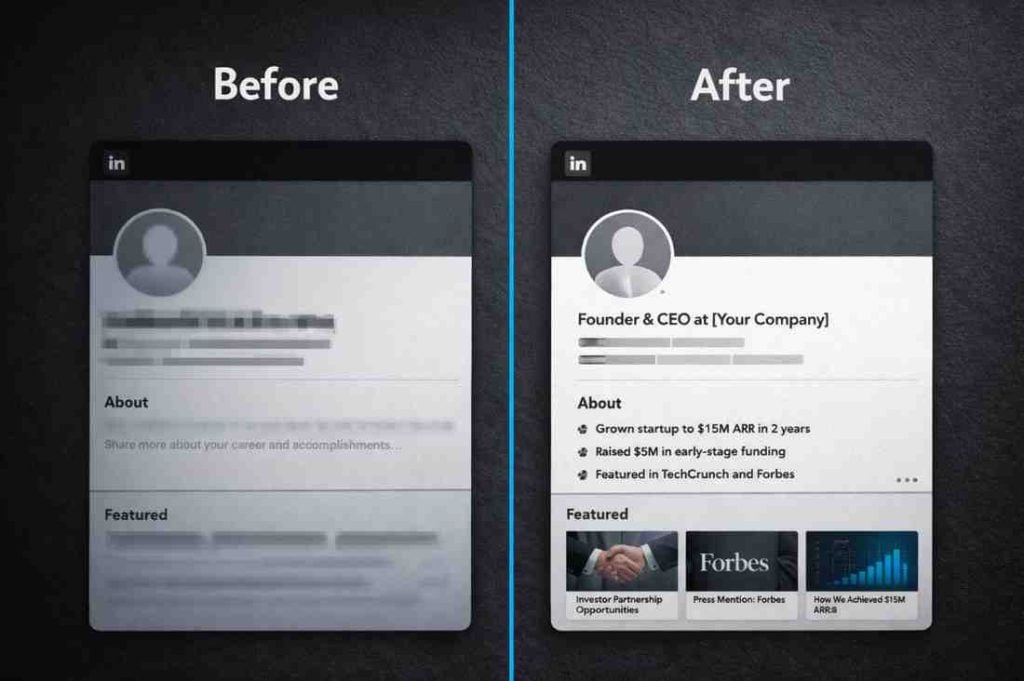
Most founders we work with have the same problem. They’ve built something real, they’re credible in a room, but their LinkedIn profile reads like a CV from 2019. Generic headline, a wall of text in the About section that starts with “I’m passionate about…”, and a Featured section either empty or pointing at a two-year-old press mention.
LinkedIn’s search in 2026 rewards outcome-focused profiles, not job title lists. If you want investor intros, inbound sales conversations, or senior hires finding you, the profile has to do work for you. It mostly won’t, unless someone has set it up properly.
Below is the full founder LinkedIn profile checklist we use across our client work. 25 items, grouped by section. We’ve also included copy templates you can pull straight from this page.
The Full Founder LinkedIn Profile Checklist
Work through each section in order. Tick as you go.
1. Headline
- [ ] 220 characters or fewer, mobile-readable in the first 68 characters
- [ ] Includes your primary keyword (e.g. Founder, CEO, SaaS)
- [ ] Leads with outcome or audience, not just job title
- [ ] Contains at least one proof signal (metric, milestone, or credibility marker)
- [ ] Avoid: “Passionate about building the future of X”
Template A (Investor focus): Founder | B2B SaaS | Raised Pre-Seed at $4M Val | Scaling to Series A
Template B (Sales focus): Founder @ [Company] | Helping [ICP] achieve [outcome] | [Proof metric]
Template C (Talent focus): Founder Hiring CTO + CRO | Bootstrapped to [revenue] | Remote-first team
We’ve seen founders move from near-zero inbound to 15+ connection requests a week by fixing one thing: the headline. The old headline said their company name and nothing else. The new one named the outcome and the audience.
2. Profile Photo
- [ ] 400x400px minimum, head and shoulders visible
- [ ] Face fills roughly 60% of the frame
- [ ] Neutral or simple background (no busy offices, no holiday snaps)
- [ ] Expression is approachable, not stiff
- [ ] Recent. If it’s 5+ years old, retake it.
According to the Stanford Career Education checklist, a professional photo dramatically increases profile engagement compared to a placeholder or logo.
3. Banner Image
- [ ] 1584x396px (LinkedIn’s current recommended dimensions)
- [ ] Includes a short value proposition as a text overlay
- [ ] Consistent with your company or personal brand colours
- [ ] Not the default blue gradient LinkedIn assigns by default
Banner copy examples:
- “We help B2B teams book 30+ qualified meetings per month.”
- “Scaling SaaS from $500K to $5M ARR.”
- “Investing in founders building the future of work.”
4. About Section
The About section is where most founders lose investor and sales attention. Too long, too early on the company backstory, not enough on outcomes.
- [ ] Under 2,600 characters (LinkedIn’s visible limit before “See more”)
- [ ] Opens with a hook sentence, not “I’m the founder of…”
- [ ] Paragraph 2 covers who you help and what outcome they get
- [ ] Paragraph 3 is your traction: 3 to 5 bullets with metrics
- [ ] Paragraph 4 is your current focus or what you’re building toward
- [ ] Closes with a specific CTA (“DM me if you’re building in [space]” or “Reach out if you’re raising Series A”)
A common mistake we keep seeing: founders write their About section as if it’s a bio for a conference programme. It talks about them in the third person, lists their previous employers, and ends without telling the reader what to do next. It’s not a bio. It’s a pitch to someone who found you in search.
About Section template (condensed):
[Hook: one sentence about who you help or what you've built]

At [Company], we [outcome for customer]. [One-line proof of traction].

What we've done:
• [Metric or milestone 1]
• [Metric or milestone 2]
• [Metric or milestone 3]

Currently: [What you're focused on right now — hiring, raising, expanding]

If you're [ICP action], DM me or connect.
Use optimizer.growleads.io to score your current About section before rewriting it.
5. Custom URL
- [ ] Set to linkedin.com/in/[firstname-lastname] or a variation
- [ ] Remove the default alphanumeric string LinkedIn assigns
- [ ] Consistent across your email signature, bio, and site
Small thing. Noticeable when it’s wrong.
6. Contact Info and Open To
- [ ] Website URL pointing to your company site or a dedicated landing page
- [ ] Email address visible to connections (or all members, depending on your goal)
- [ ] “Open To” section configured if you’re actively fundraising, hiring, or seeking partnerships
For founders raising: set Open To as “Finding Investors”. LinkedIn surfaces this in search filters used by VCs and angels.
Why the 2026 Algorithm Rewards Outcomes Over Titles
LinkedIn’s search rankings have shifted. The platform now treats your headline, About section, and activity as signals of expertise, not just employment.
A headline like “Founder & CEO at Acme Corp” tells the algorithm nothing useful. A headline like “Founder | B2B SaaS | ARR $2M+ | Helping sales teams book 3x more meetings” maps cleanly to search queries from investors, buyers, and potential hires.
ProResource’s 2026 profile analysis confirms that keyword placement in the headline and first 300 characters of the About section directly affects how often a profile surfaces in LinkedIn search.
The practical implication: write for the person searching, not for the person who already knows you.
CEO Personal Brand Optimisation: Experience and Featured Setup
7. Experience Section
- [ ] Current role has 3 to 5 bullet points, each starting with a verb and metric
- [ ] Past roles are relevant and trimmed (no university roles from 15 years ago unless strategic)
- [ ] Each bullet answers: “What did I do, and what did it produce?”
Bullet structure: [Verb] + [what you did] + [result or scale]
Examples:
- “Grew ARR from $0 to $1.8M in 18 months across 60 accounts”
- “Built outbound engine that generated 400+ qualified SQLs in first year”
- “Secured $2.5M pre-seed from [Fund Type] investors”
For a deeper look at how to structure your experience section for investors and enterprise buyers, see our Founder Optimisation Guide.
8. Featured Section
This is one of the most underused parts of a founder profile.
- [ ] At least 3 items pinned (post, website, or document)
- [ ] Item 1: Your highest-performing post or a traction metric update
- [ ] Item 2: Your company website or a dedicated landing page
- [ ] Item 3: A useful asset (investor deck cover, case study PDF, or press feature)
- [ ] Custom thumbnails for each item where possible
One of the best uses of the Featured section we’ve seen: a founder pinned a 3-month-old post about hitting $1M ARR. It had 400 reactions. Every new profile visitor saw it within 5 seconds. That post became the most-mentioned thing in inbound DMs.
The Featured section auto-refreshes, so you’ll need to re-pin occasionally. Set a monthly reminder. Use tools.growleads.io to track which content performs well enough to pin.
9. Skills and Endorsements
- [ ] Top 5 skills are founder-relevant (e.g. Fundraising, Business Development, Scaling, Go-to-Market, SaaS)
- [ ] Aim for 20+ endorsements on primary skills
- [ ] Remove skills that no longer reflect your current focus
Skills aren’t a decision-maker for most profiles, but they do feed LinkedIn’s keyword matching. Get them right, then move on.
10. Recommendations
- [ ] At least 5 recommendations visible on your profile
- [ ] Each recommendation references a specific outcome or result
- [ ] Recommendations span at least 3 different relationship types (investor, customer, team member)
The highest-value recommendations mention concrete results: “Led to a $300K contract”, “helped us close 3 new enterprise accounts”. Generic “great to work with” recommendations don’t do anything useful.
Executive Profile Guide: Visuals, Settings, and Activity
Profile Photo and Banner Technical Specs
| Element | Spec | Common Mistake |
|---|---|---|
| Profile photo | 400x400px, JPG or PNG | Blurry, cropped too wide |
| Banner image | 1584x396px | Default LinkedIn blue left in place |
| Photo face fill | ~60% of frame | Too much background |
| Banner text | Left-aligned, legible at mobile size | Text cut off on mobile |
| File size | Under 8MB per asset | Slow-loading or refused upload |
For technical photo standards, the Granth CEO guide covers specific framing and lighting considerations worth reviewing.
11. Creator Mode
- [ ] Creator Mode switched on if you post at least once a week
- [ ] “Follow” button is now the primary CTA on your profile (replaces “Connect”)
- [ ] 5 topics selected that match your actual content, not aspirational categories
- [ ] Link added to Creator Mode profile header (usually company site or newsletter)
Note: Creator Mode shifts your profile from connection-first to audience-building. If you’re using LinkedIn primarily for direct outreach, keep it off. If you’re trying to build inbound, switch it on.
12. Post Cadence and Activity Layer
The algorithm treats profile activity as a relevance signal. A profile that hasn’t posted in 8 months ranks lower than one that posted 3 days ago.
- [ ] Minimum 2 posts per week
- [ ] At least one post per month includes a traction or milestone update
- [ ] Comments on 5 to 10 posts per week from people in your ICP
What we’ve found across 50+ founder profiles: the ones generating consistent inbound aren’t necessarily posting viral content. They’re posting specific, short updates about what they’re building, what’s working, and what they’re learning. Consistency matters more than reach.
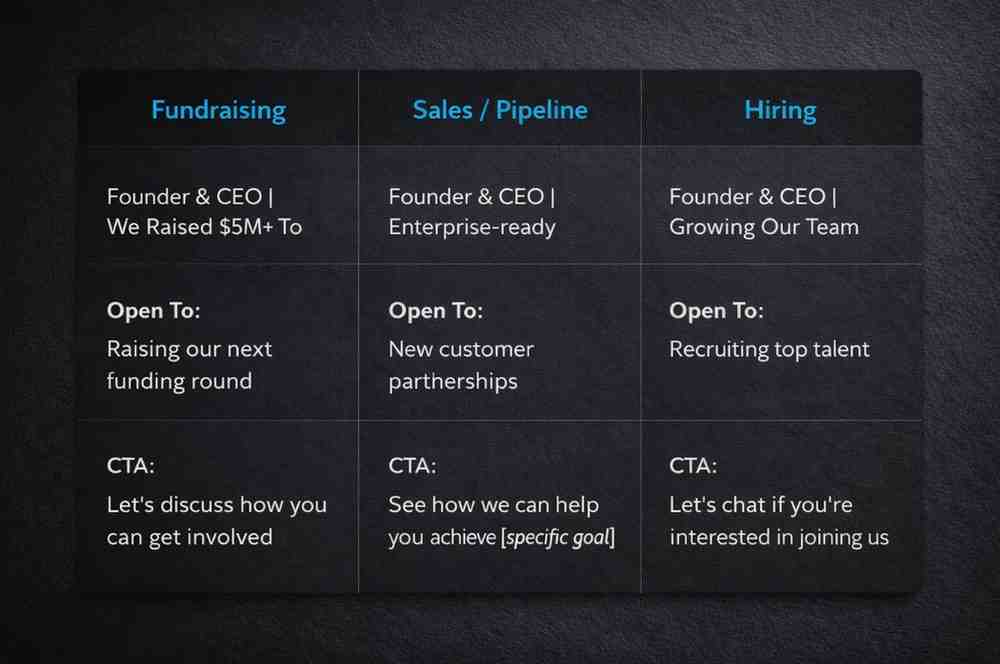
Optimise LinkedIn Profile: The Default Setups by Goal
Your profile shouldn’t look the same whether you’re raising, selling, or hiring. Here are the three configurations we recommend:
| Goal | Headline Format | Open To Setting | About Section CTA |
|---|---|---|---|
| Fundraising | “Founder Raising [Stage] | [Traction Signal]” | Finding Investors |
| Sales / pipeline | “Founder | We help [ICP] achieve [outcome]” | Not set |
| Hiring | “Founder Hiring [Role] | [Company Signal]” | Hiring |
Switch between these setups actively. Most founders set it once and leave it, even when their primary goal has shifted.
The Common Mistakes We See Most Often
A short list of what we fix first when auditing a founder profile:
- Vague headline with no proof. “Building the future of X” tells nobody anything. Add a metric or a specific audience.
- About section written as a bio. Third-person, past-focused, no CTA. Rewrite it in first person, forward-focused, with a clear next step.
- Empty or stale Featured section. No pins, or a pin from two years ago. Update it with your best recent post.
- No recommendations with specifics. Generic endorsements look like placeholder content. Request recommendations that reference outcomes.
- Inconsistent activity. Posting once a month and expecting compound reach. Commit to a cadence or don’t treat it as a channel.
What to Do Next
If you want to run this checklist against your current profile, head to optimizer.growleads.io. It takes about 3 minutes and gives you a prioritised fix list.
If you’d rather walk through it with us, here’s what we check in a founder profile audit:
- Headline: keyword match, proof signal, mobile readability
- About section: structure, outcome clarity, CTA presence
- Featured section: recency, asset quality, click-through logic
- Activity: post cadence, engagement pattern, ICP reach
Email us or book a call via Growleads.io and we’ll run through it with you.
1. How do we write a founder LinkedIn headline in 2026?
Lead with your outcome or audience, not just your title. A working formula is: “Founder | [What you help with] | [Proof signal]”. Keep it under 220 characters and make sure the first 68 characters are readable on mobile, as that’s what shows in most search results. Avoid vague phrases like “passionate about innovation” since they add no signal. Replace them with a metric, a raise stage, or a specific ICP.
2. What is the best LinkedIn profile photo for CEOs and founders?
A professional headshot where your face fills roughly 60% of the frame, with a clean or neutral background. You don’t need a studio, but the image should be sharp, recent, and approachable. Avoid logos, group shots, or photos where the background competes with your face. It’s a small detail, but a blurry or dated photo drops connection acceptance rates noticeably.
3. How long should a founder LinkedIn About section be?
Under 2,600 characters, which is roughly 400 to 500 words. Write enough to answer three questions: who you help, what you’ve done, and what the reader should do next. Most founders write too much background and too little outcome. If you’re hitting the character limit, cut the origin story and expand the traction section.
4. What keywords should go in a founder LinkedIn profile?
Focus on words your target audience would actually search: your sector (SaaS, FinTech, B2B), your ICP (sales leaders, CMOs, Series A investors), your product type (outbound platform, analytics tool), and outcome language (pipeline, ARR, revenue growth). Distribute these naturally across your headline, About section, and experience bullets. Don’t stack them in one place.
5. How do we optimise LinkedIn for investors as a founder?
Three moves: set your “Open To” to “Finding Investors”, rewrite your headline to include your raise stage and traction signal, and pin a recent milestone post in your Featured section. Investors using LinkedIn search filter by these signals. Your About section should also open with what stage you’re at and what you’re raising for, before any company backstory.
6. What should go in a founder LinkedIn Featured section?
Pin three items: a recent high-performing post (especially one with traction data), your company website, and one useful document or asset (a case study, an investor one-pager, or a press feature). Update your pins at least once a month. Stale Featured sections signal to visitors that the profile isn’t active.
7. How do we get useful recommendations on LinkedIn as a founder?
Ask specifically. When you request a recommendation, tell the person what outcome or project you’d like them to reference. Generic recommendations (“great to work with”) carry almost no weight. A recommendation that says “helped us generate 12 enterprise meetings in the first month” is worth five generic ones. Aim for at least 5 recommendations across investors, customers, and team members.
8. What’s the best LinkedIn banner for founders raising funds?
Use 1584x396px and include a short, bold value proposition as a text overlay. Something like “Raising Series A | $1.2M ARR | 40% MoM growth” works well. Keep the text left-aligned and readable at mobile size, as a significant share of your profile views happen on phone. Avoid the default LinkedIn background and avoid image-only banners with no text.
9. How often should we update a founder LinkedIn profile?
Review your headline and About section at least once per quarter, or whenever your primary goal changes (fundraising to hiring, for example). Update your Featured section monthly. Your experience section should be updated within two weeks of any major milestone. Activity (posts and comments) should be consistent week to week, not in occasional bursts.
10. Does LinkedIn Creator Mode help founder profiles?
It depends on your goal. Creator Mode replaces “Connect” with “Follow” as your primary profile action, which suits founders building an audience or inbound pipeline. If you’re using LinkedIn primarily for direct outreach and connection building, keep it off. If you’re posting at least twice a week and want to grow a following alongside your sales activity, switch it on and select 5 relevant topic tags.
Kuldeep is part of the Growleads team, working on SEO and automation to help improve lead generation systems. He focuses on building simple automated workflows, optimizing content processes, and learning to create scalable growth systems.