
Is LinkedIn Automation Risky? Ban Prevention Guide
If you’re running LinkedIn outreach at any volume, this guide covers what gets accounts restricted, how detection actually works, and the limits we use to keep our clients’ accounts clean.
Roughly 1 in 4 teams using automation hit a LinkedIn restriction within 90 days. That’s not a fringe risk. That’s a meaningful chance your pipeline stalls mid-quarter while you verify identities and wait for access to come back.
Most teams don’t get banned because they’re doing something obviously wrong. They get flagged because LinkedIn’s detection system picks up non-human patterns, and nobody told them where the line was.
We’ll walk you through how detection works, what the safe outreach limits actually are, and the exact warm-up steps we use with clients to bring ban risk down significantly. Quick win first: cap your connection requests at 20 per day, personalise every message, and watch your acceptance rate. If it drops below 20%, pause and fix your targeting before anything else.
The Real Risks of LinkedIn Automation
Let’s be straightforward about this. Automation itself isn’t the problem. Badly configured automation is.
LinkedIn’s systems are looking for patterns that don’t match how a human would naturally use the platform. When they find them, restrictions happen fast, and they escalate quickly if you push through them.
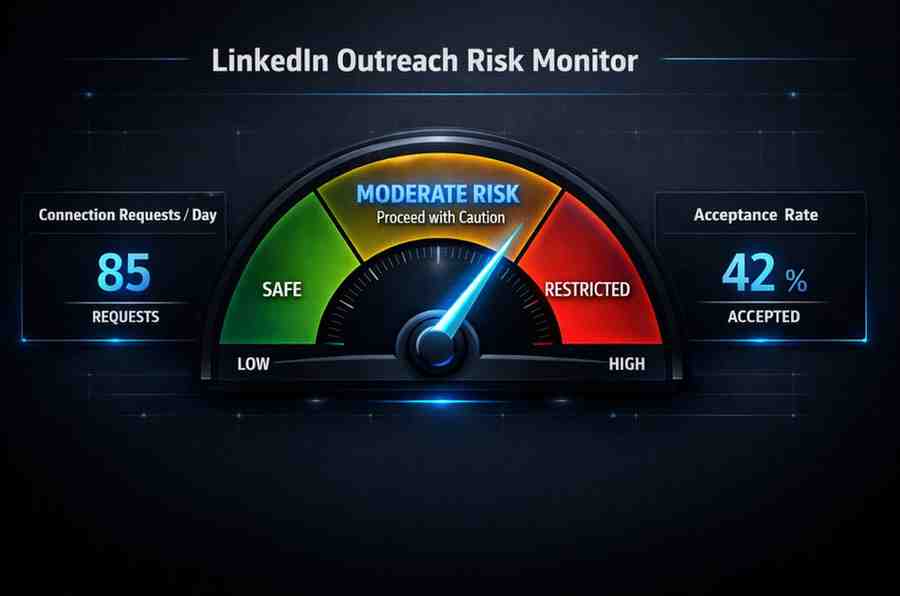
According to our 2026 ban risk analysis, around 23% of automation users face a restriction within their first 90 days. That number climbs sharply when teams skip warm-up periods or run high volumes on fresh accounts.
Types of Restrictions: From Temporary to Permanent
LinkedIn doesn’t jump straight to a permanent ban. The escalation usually looks like this:
- Temporary lock (1–24 hours): First offence. You’ll be asked to verify via phone or CAPTCHA. Treat this as a serious warning.
- Extended restriction (days to weeks): Repeated pattern violations. Access is throttled or partially suspended.
- Permanent ban: Account removed. No recovery path. Sales Nav subscriptions do not prevent this.
The jump from temporary to permanent happens faster than most people expect. If you hit a CAPTCHA prompt or restriction notice, stop all automation immediately and let the account rest for at least 48 hours.
A common mistake we keep seeing: teams get a temporary lock, wait a few hours, then carry on at the same volume. That’s usually what triggers the permanent restriction.
How LinkedIn Detects Automation
LinkedIn uses behavioural analysis, not just volume checks. Knowing this changes how you should think about your setup.
The detection signals according to research from Famelab include:
- Action velocity: Sending 50 connection requests in 20 minutes doesn’t look human. Humans browse, pause, read profiles.
- IP and device fingerprinting: Data centre IPs or shared proxies are a red flag. Residential IPs tied to a consistent device are much cleaner.
- Message uniformity: Identical message bodies sent in bulk trigger content-pattern detection. Even minor variation matters.
- Timing patterns: Activity at 3am every night, or perfectly regular intervals (every 90 seconds, on the dot), reads as automated.
- Engagement ratio: Sending 200 requests with a 5% acceptance rate signals poor targeting, which LinkedIn reads as spam behaviour.
The 2026 update specifically improved ML pattern recognition. Older tools that randomised delays slightly are now flagged more readily because the randomisation itself has become a known automation signature.
What we changed when this didn’t work: we moved clients away from fixed-delay randomisation toward human-session mimicking, where the tool follows natural browsing intervals rather than scripted pauses.
LinkedIn Account Restriction Rules
LinkedIn’s official restriction policies are clear on one point: any tool that accesses LinkedIn outside of their official API violates their terms of service. That includes most third-party automation tools, regardless of how they’re marketed.
This doesn’t mean all automation is immediately fatal. LinkedIn enforces on behaviour, not just tool type. But it does mean you’re operating outside the rules, and the consequences if you’re flagged are entirely at LinkedIn’s discretion.
Key TOS boundaries to understand:
- Scraping is prohibited. Pulling profile data in bulk without permission is an automatic violation.
- Automated messaging is prohibited unless done via the official API.
- Bot-like behaviour (defined broadly) gives LinkedIn grounds to act without notice.
Premium accounts and Sales Navigator subscriptions do not grant permission to use third-party automation tools. They raise your daily activity ceilings, but they don’t change your TOS obligations.
Safe Outreach Limits for LinkedIn in 2026
This is the table most teams need and rarely have in one place. These figures are drawn from safe limits research and our own client data.
| Action | Free Account | Premium | Sales Navigator |
|---|---|---|---|
| Connection requests/day | 10–15 | 20–25 | 25–35 |
| Connection requests/week | 50–70 | 80–100 | 100–150 |
| Profile views/day | 50–60 | 80–100 | 100–150 |
| Messages/day | 15–20 | 25–35 | 35–50 |
| InMails/month | 0 | 15–25 | 50 (allotment) |
| Pending requests ceiling | Under 150 | Under 200 | Under 250 |
A few rules that sit on top of these numbers:
- If your pending requests go above the ceiling for your account type, withdraw old ones before sending new ones.
- Never hit your daily limit 7 days in a row. Build in 1–2 lighter days per week.
- Acceptance rate below 20%: pause immediately. Below 15%: stop and audit your targeting before resuming.
We’ve kept 500+ accounts restriction-free using these limits paired with proper warm-up sequences. The limits aren’t arbitrary. They’re based on what LinkedIn’s systems consistently tolerate. You can test our compliant tools to see this in practice.
How to Avoid LinkedIn Jail: The Warm-Up Protocol
“LinkedIn jail” is what happens when your account gets flagged and locked out, sometimes temporarily, sometimes not. The fastest way to land there is starting at full volume on a new or recently reactivated account.
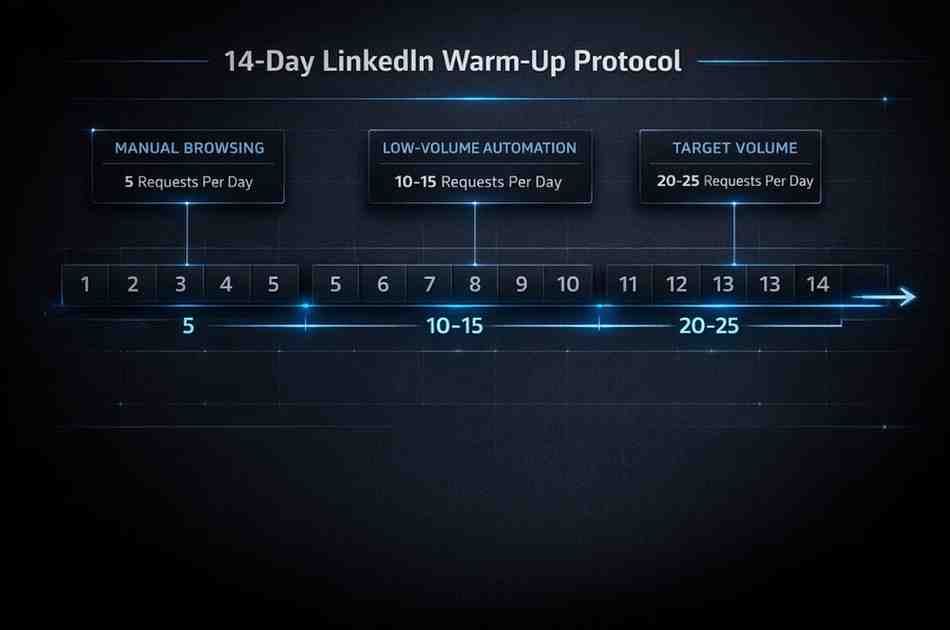
Here’s the 14-day warm-up we use, broken into phases:
Days 1–3: Manual only. 5 connection requests per day. Browse naturally. Comment on 3–5 posts. No automation running.
Days 4–7: Introduce your tool at the lowest setting. 8–10 requests per day. Vary timing. Keep messages short and personal.
Days 8–11: Ramp to 15 requests per day. Add profile views (40–50/day). Monitor acceptance rate closely.
Days 12–14: Move to your target volume, capped at 20–25/day for standard accounts. Check acceptance rate and pending queue daily.
This ramp takes a 14-day commitment. It’s not optional if you’re starting fresh or coming back from a restriction.
Our clients who follow the full warm-up protocol consistently land below a 5% restriction rate. Clients who skip it and start at full volume are the ones calling us with account lockouts two weeks later.
Two other habits that compound with the warm-up:
Personalisation at 100%. Reference something specific: a post they wrote, a mutual connection, a role change. Volume without personalisation is the fastest route to low acceptance rates and restriction flags.
Vary your timing. Don’t run automation at the same hours every day. Mix morning, midday, and afternoon sessions. Avoid overnight runs entirely.
What to Do If Your Account Gets Restricted
If it happens, here’s the order of operations.
Step 1: Stop everything. Turn off all automation tools immediately. No exceptions.
Step 2: Complete the verification. LinkedIn will usually ask for a phone number or CAPTCHA. Do it straight away. Delays make things worse.
Step 3: Rest the account. Wait 48–72 hours before any significant activity, automated or manual.
Step 4: Audit before resuming. Look at your acceptance rate, daily volumes, message templates, and IP/device setup. Identify the likely trigger before you turn anything back on.
Step 5: Ramp up again from scratch. Treat it like a new account warm-up. Don’t assume you can pick up where you left off.
If the restriction is permanent, the account is gone. There is no formal appeals process for most users. Prevention is the only reliable strategy.
Growleads Safe Alternatives for Compliant Outreach
We built our outreach approach around staying inside LinkedIn’s tolerance thresholds, not guessing at them.
The tools at optimise safely with Growleads are set up to enforce the limits from the table above, run human-paced sessions, and flag anomalies before they become restrictions. They don’t promise magic volume. They promise you keep your account.
What compliant scaling actually looks like in practice:
- Accounts stay active and unrestricted across full campaign cycles.
- Outreach volumes are lower per day, but compounding over weeks produces better pipeline than a high-volume sprint followed by a 2-week lockout.
- Acceptance rates stay above 30% because targeting is tighter and messages are personalised.
Our clients have seen 800% growth in profile views from structured, compliant campaigns. No bans. No recovery downtime.
The trade-off is real: compliant outreach is slower per day. But it’s the only approach that’s sustainable when LinkedIn is a primary channel for your pipeline.

Before You Go
If you want us to look at your current LinkedIn setup and flag what’s likely to cause problems, here’s what we review:
- Daily volume vs. your account type ceiling
- Warm-up history and current acceptance rate
- Message personalisation and template variation
- IP/device setup and tool configuration
- Pending requests queue status
You can book a call with us to walk through this, or reach out directly and we’ll tell you where the gaps are.
1. What are the risks of LinkedIn automation?
The main risks of LinkedIn automation are account restrictions, temporary locks, and permanent bans. LinkedIn’s systems detect non-human behaviour patterns, including high velocity, identical messages, and data centre IPs. Around 23% of users running automation face a restriction within 90 days. Beyond the account risk, a ban mid-campaign means pipeline disruption that can take weeks to recover from.
2. How does LinkedIn detect automation tools?
LinkedIn uses behavioral analysis across several signals: action velocity, IP fingerprinting, message uniformity, timing patterns, and engagement ratios. It’s not just about volume. Perfectly regular intervals and scripted delays are now recognised as automation signatures by LinkedIn’s ML systems. Human-session mimicking, with natural browsing pauses and varied timing, is far less likely to trigger detection.
3. What are safe outreach limits on LinkedIn in 2026?
For standard accounts, the safe range is 20–25 connection requests per day and under 100 per week. Sales Navigator accounts can go up to 25–35 per day. Profile views should stay under 100 per day for most account types. Keep pending requests below 150–200 depending on your tier, and build in lighter days each week rather than hitting your ceiling every day.
4. How do we avoid LinkedIn jail?
Follow a 14-day warm-up before running any serious volume on a new or reactivated account. Start at 5 requests per day manually, then ramp gradually. Personalise every message. Monitor your acceptance rate, and pause if it drops below 20%. Use residential IPs, vary your activity timing, and never run automation overnight. These steps combined bring restriction risk down significantly.
5. What does a LinkedIn account restricted notice actually mean?
It means LinkedIn has flagged your account for violating its usage policies, usually due to automated behaviour. Depending on severity, you’ll be asked to verify your identity, or your account will be temporarily or permanently suspended. The first restriction is usually a phone or CAPTCHA verification. Treat it as a serious warning and stop all automation immediately before addressing it.
6. Can LinkedIn automation get you permanently banned?
Yes. Permanent bans happen when accounts repeatedly trigger LinkedIn’s detection systems after prior restrictions. The escalation is usually: temporary lock, extended restriction, permanent removal. Pushing through a temporary lock at the same volume is one of the most common causes of permanent bans. There is no standard appeals process once an account is permanently removed.
7. What are LinkedIn’s connection request limits in 2026?
Free accounts should stay under 10–15 per day and 50–70 per week. Premium accounts can reach 20–25 per day and 80–100 per week. Sales Navigator accounts have the most room, up to 35 per day and 150 per week. These are practical thresholds based on observed behaviour, not officially published limits. LinkedIn does not publicly confirm specific numbers.
8. How do we recover a restricted LinkedIn account?
Complete whatever verification LinkedIn requests immediately. Rest the account for 48–72 hours with no automation running. Then audit your setup to find the likely trigger before resuming any activity. Ramp back up from scratch as if it were a new account. If the restriction is permanent, there is no reliable recovery path, which is why prevention through proper limits and warm-up is the only durable strategy.
9. Is LinkedIn Sales Navigator safer for automation?
Sales Navigator gives you higher activity ceilings, which creates more headroom before triggering volume-based flags. But it does not change your TOS obligations, and LinkedIn’s behavioural detection applies equally to Navigator accounts. A Navigator account running 100+ requests per day with identical messages will still get restricted. The account type helps, the behaviour still has to be right.
10. What do LinkedIn’s terms of service say about automation?
LinkedIn’s terms explicitly prohibit using tools that access the platform outside of their official API. This includes scraping, automated messaging, and bot-like behaviour. Using third-party automation tools is a TOS violation regardless of how the tool is marketed. You can review LinkedIn’s official restriction policies directly. Operating within safe limits reduces your detection risk, but it does not change the underlying TOS position.

Kuldeep is part of the Growleads team, working on SEO and automation to help improve lead generation systems. He focuses on building simple automated workflows, optimizing content processes, and learning to create scalable growth systems.